How to Get Pay Stubs From Direct Deposit (2026 Guide)
By Jaden Miller , October 7 2026
Wondering how to get pay stubs from direct deposit? Log in to your employer's payroll portal or ask your payroll department for a copy. Your bank can't provide one, because it only sees the deposit.
Direct deposit moves your net pay into your bank account, but it doesn't send the itemized stub that shows gross pay, taxes and deductions. If you run payroll, you can create pay stubs for your team in minutes, since employees expect one every payday. Employees, in turn, need that stub for rentals, loans and tax records. Below, you'll find the best ways to obtain a stub from portals, payroll teams and former employers, plus what to do when none exists.
Key Takeaways
- Check your employer's payroll portal first, then email payroll or HR.
- Your bank can show deposits, but it can't issue a stub.
- Ask for former employer stubs in writing, and save a PDF every payday.
- Employers should keep stubs accessible and keep payroll records on file.
What a Direct Deposit Pay Stub Shows
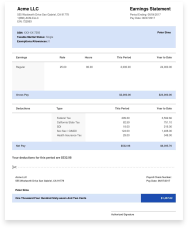
A direct deposit pay stub is the itemized record of one pay period, even though no paper check exists. Start with the pay period dates and the pay date, which can differ. Next come gross pay, taxes (federal, Social Security, Medicare, plus state and local where they apply) and deductions.
Then find the distribution block. It lists net pay and a masked bank account number, usually just the last four digits. Net pay should match what landed in your account. With split deposits, the amounts across both accounts should add up to net pay. If they don't, ask payroll before the next cycle.
Where to Find Pay Stubs Online

Most employers publish stubs through a self-service portal run by their payroll provider, and large ones host their own, like Amazon's pay stub portal. Bookmark the login page and turn on payday notifications in the provider's app. Download a PDF each payday, because access often ends when you leave.
How to Get My Pay Stubs Online
- Find the portal address in your offer letter, onboarding email or HR intranet.
- Register with your employee ID or employer code.
- Open the pay or earnings section and select the pay date.
- Download the PDF and save it to cloud storage.
How to Get Pay Stubs From ADP
ADP employees sign in through MyADP at my.adp.com or the ADP Mobile app. Our ADP pay stub guide covers setup in detail. First-time users need a registration code that only the employer can provide, according to ADP's login page. Some employers use ADP iPayStatements to view and print pay statements and W-2s.
How to Get Pay Stubs From Workday
In Workday, open the Menu, choose Pay, then Payslips. Select the payslip you need and download or print the PDF. Labels can vary with your employer's setup.
How to Get Pay Stubs From Direct Deposit: Ask Payroll or HR
No portal access? Contact your payroll department or human resources department directly. Email works best because it leaves a record, and a PDF reply lets you get your pay stub the same day. Include your full name, employee ID and the pay dates you need, and ask for a PDF. At a small business, company payroll often sits with one person, so start with the owner or office manager.
Can I Get Pay Stubs From My Bank?

No. Your bank sees only the deposit: the amount, the date and the payer's name. It never receives your gross pay, tax withholdings or deductions, so it can't produce a pay stub. Ask your employer's payroll team for the stub instead.
What your bank can give you is a statement showing recurring payroll deposits. Some landlords and lenders accept it as supporting proof of income, but it won't replace a stub. Download statements for the same months your stubs cover.
How to Get Pay Stubs From Previous Employer Payroll
Former employees usually lose portal access, so send a written request to the old employer's payroll department. Include your full name, dates of employment, the pay periods you need, a delivery address or email, and only the last four digits of your Social Security number. Large employers often run a separate former-employee process, as with Walmart's W-2 steps.
Employers must keep payroll records for at least three years under the FLSA, according to the U.S. Department of Labor, and the IRS asks for employment tax records for at least four years. If the employer ignores you, contact your state labor department. Our guide to accessing pay stubs covers more scenarios.
I Got My Pay Stub but No Direct Deposit
Don't assume payroll skipped you. Work through these checks in order:
- Compare the pay date on the stub with today's date. Stubs often post before funds do.
- Allow for bank posting delays and holidays, which can push a deposit back.
- Match the masked account number on the stub to your real account. A closed or changed account can send the money back.
- Remember that a first deposit can take longer while the account is verified.
- Contact payroll with the stub in hand.
How to Get Pay Stubs From Direct Deposit When Your Employer Gives None
The U.S. Department of Labor says the FLSA doesn't require employers to provide pay stubs to employees. Most states set their own pay statement rules, including whether electronic-only stubs are allowed, so check your state labor department's site. Ask your employer in writing first. If nothing arrives, document your income with bank statements showing payroll deposits, a tax return or an employment verification letter.
Pay yourself or a small team without payroll software? A direct deposit pay stub template gives you a consistent record. Our paystub templates calculate withholdings for you.
What Employers Should Provide on Every Payday
As an employer, you shouldn't make people chase you for pay documentation. Providing a stub every payday is the safe practice, and some states require it. Show the pay period, gross pay, each withholding, deductions and net pay. Confirm your state's rules on paper pay stubs versus electronic delivery.
Keep a PDF for every employee and every cycle, using the retention periods above. Then an employee's request, or a lender's verification call, takes minutes instead of days. That also protects you in audits. If you run payroll in QuickBooks, our QuickBooks paystub guide shows where stubs live.
You Might Also Like
- Walmart Paystub Portal
- 7-Eleven Pay Stub Portal
- Family Dollar Pay Stub
- Dollar Tree Paystub
- Pay Stub vs Payslip
Conclusion
Your pay stub lives in your employer's payroll system, not at your bank. Save a PDF every payday, and ask in writing when the portal is out of reach. If your employer provides no stub, or you manage payroll for a small team, use a reliable paystub generator to create accurate pay documentation in minutes.



Frequently Asked Questions
Similar Articles


We’ve helped numerous individuals and businesses create professional documents! Create yours today!