








How to Amend a Tax Return With Our 1040X Generator
Here's how to amend taxes without redoing your entire return.
- Pull your original return and source documents. You'll need the return as filed, plus the pay stubs you used for tax filing, W-2s, and 1099s behind it. Column A needs your original figures, so having those open makes the rest quick.
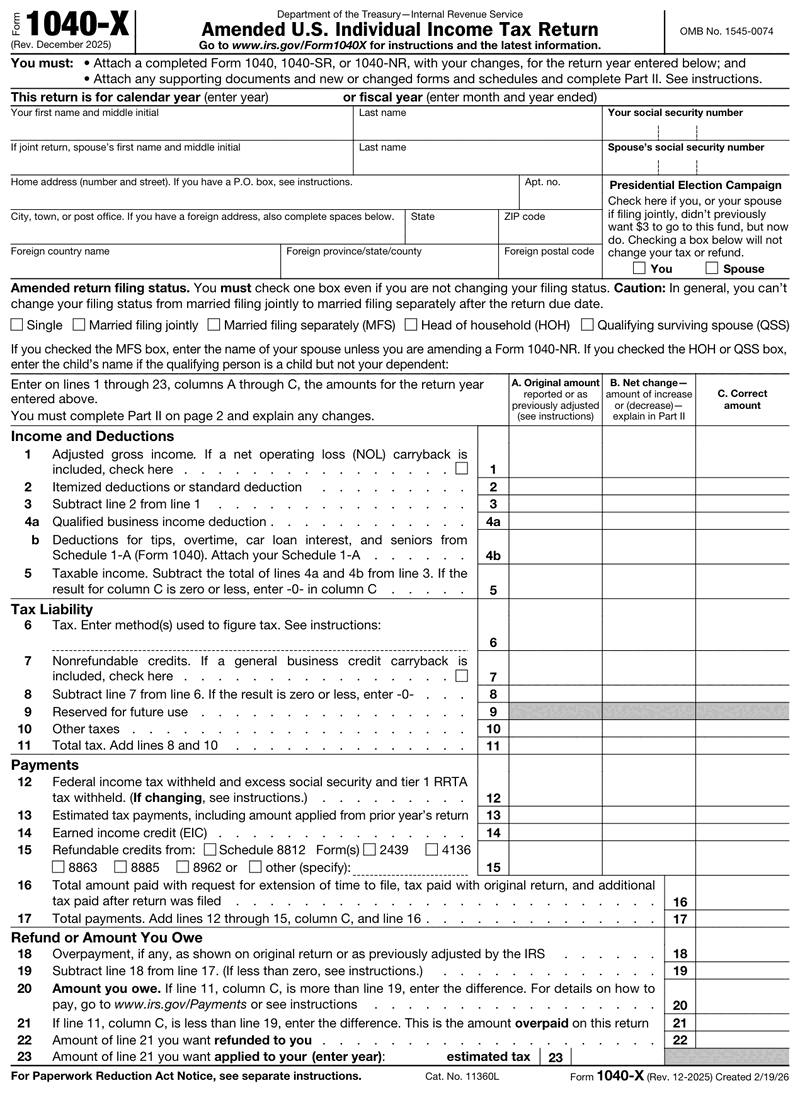
- Enter your identifying information exactly as it appeared before. Your name and Social Security number must match the original return so the IRS can pair the two. Filing status is different: check the status that applies to the amended return, even if it is not changing. If you are changing it, check the new status and explain the change in Part II.
- Enter the original and corrected amounts. Work from the actual trigger. If a W-2c raised your wages by $2,400, that's the figure that moves. The generator handles the net change column.
- Write your Part II explanation. One or two sentences naming the form, the amount, and the reason.
- Review, download, and submit. Print it for mailing, or keep it as your e-filing reference copy.
Need clean income records to support the figures you're correcting? Our pay stub templates keep your documentation consistent year to year.
Amending After Late or Corrected Business Income
For self-employed filers and small business owners, the most common reason to file an amended tax return isn't a typo. It's late income.
A client issues a corrected 1099-NEC in April, and the difference between a 1099-MISC and a 1099-NEC decides which figures move. Either way your reported business income changes, and so does your tax liability.
Here's the step most filers miss. Adding self-employment income doesn't just change the income line on your 1040. It changes your Schedule SE, because self-employment tax is calculated on that net profit, the same figure behind your quarterly tax estimates. Correct the income without recomputing Schedule SE and your amendment is wrong in a second place.
Work the deduction side too. If you're reporting additional revenue, check for unclaimed expenses from that same work.
1040X Deadlines and Eligibility
You don't have unlimited time to amend tax return mistakes. For taxpayers claiming a refund, it's three years from the date you filed the original return, or two years from the date you paid the tax. Whichever is later is your deadline.
One detail most sites skip: if you filed early, the IRS treats your return as filed on the due date. A February filing for a return due April 15 starts its three-year clock in April. The official IRS guidance on amended returns confirms this.
E-filing is available for the current tax year and the two prior tax periods. Anything older has to go in on paper.
How to Check Your 1040X Status
The IRS "Where's My Amended Return?" tool tracks your amendment from receipt to completion. Most filers search some version of where my amendment stands, and this is the tool that answers it: it covers the current tax year plus up to three prior years. You will need your Social Security number, date of birth, and ZIP code. The tool shows three stages: Received, Adjusted, and Completed. The IRS generally allows 8 to 12 weeks for processing, and up to 16 weeks in some cases.
Received confirms the IRS has your amendment. Adjusted means it applied the change to your account. Completed means the case is closed and any notice or refund is on its way.
If the tool still shows nothing after three weeks, the IRS status line is 866-464-2050.
Business filers should treat the pending window as a record-keeping obligation. Keep the corrected source documents, your copy of the amendment, and your explanation together until the status reads Completed. If the IRS follows up, that's the file you'll need, and the common IRS audit red flags tell you how complete it should be.
Why Use a 1040X Form Generator
A blank IRS PDF gives you fields and nothing else. Our generator adds guided prompts, handles the net change arithmetic, and produces a clean tax form ready to print and mail. Working from a guided form instead of a blank PDF also means the net change column reconciles before you print, not after the IRS writes back.
It's a web form, so there's nothing to install and you can work from any device. Save your corrected copy with your other records, alongside any self-employed pay stub documentation, for a complete paper trail.
Which Tax Year Does Your 1040-X Cover?
There is no annual Form 1040-X. One continuous-use version, Rev. December 2025, amends every open tax year, and you write the year you are correcting into the blank calendar-year field at the top. So when a client asks for the "1040-X 2025" or the "1040-X 2026," they mean the tax year of the return being fixed, not a different document.
The deadline works the same way: it keys to your own filing date, not to a calendar the IRS publishes. Two illustrations (derived, not IRS-published): a 2025 return filed on or before April 15, 2026 has a refund window closing April 17, 2029, and a 2026 return filed on or before April 15, 2027 closes April 15, 2030. File that return on extension in October 2026 instead and the window runs to October 2029. There is no single amendment deadline for a tax year.
Three things to know before you file. No extension of time to file a 1040-X exists, though federally and state-declared disasters and combat-zone service can postpone or lengthen the window. Amending to pay more tax, rather than to claim a refund, carries no lookback deadline at all. And paper filers must now attach a completed, updated Form 1040, 1040-SR or 1040-NR.