








How to Calculate Self-Employment Tax
Start with net earnings, not gross. Take your Schedule C net profit and multiply by 92.35%. That adjustment exists because employees don't pay Social Security tax on their employer's half, and this evens the treatment.
Apply the se tax rate to what's left. The rate is 15.3%, split into 12.4% for Social Security and 2.9% for Medicare. Only the Social Security piece is capped. For 2026 that cap is $184,500 of combined wages and net earnings, which puts a ceiling of $22,878 on the Social Security portion. Medicare keeps going with no limit, and earnings above $200,000 (or $250,000 filing jointly) pick up another 0.9%. You can confirm the current base at the Social Security Administration.
Here's how does self employment tax work in practice. Say your business nets $80,000:
- $80,000 x 92.35% = $73,880 in net earnings subject to tax.
- $73,880 x 15.3% = $11,304 in federal self employment tax.
- Half of that, $5,652, comes back as a deduction on your Form 1040.
One habit saves a lot of pain: set aside 15% to 20% of every client payment as it arrives. This tax stacks on top of income tax, and waiting until April to discover the total is how solid businesses end up scrambling for cash.
Self-Employed Tax Deductions and the Half-Tax Write-Off
Think of deductions as happening at two separate moments, before and after the tax is calculated.
The first moment is Schedule C. Every legitimate business expense you record there, software, mileage, home office, contractor payments, reduces net profit. Since that profit is the input to the SE calculation, self employed tax deductions cut your self-employment tax before it's ever computed. A missed expense costs you twice, once on income tax and once here.
The second moment happens on the form itself. The deductible part of self-employment tax is exactly half of what you owe, and the schedule calculates it for you. It's an above-the-line adjustment on Form 1040, so you claim it even if you take the standard deduction. It reduces income tax only, not the self-employment tax itself.
Need pay documentation to go with those records? Our pay stub templates give self-employed owners a clean, consistent format.
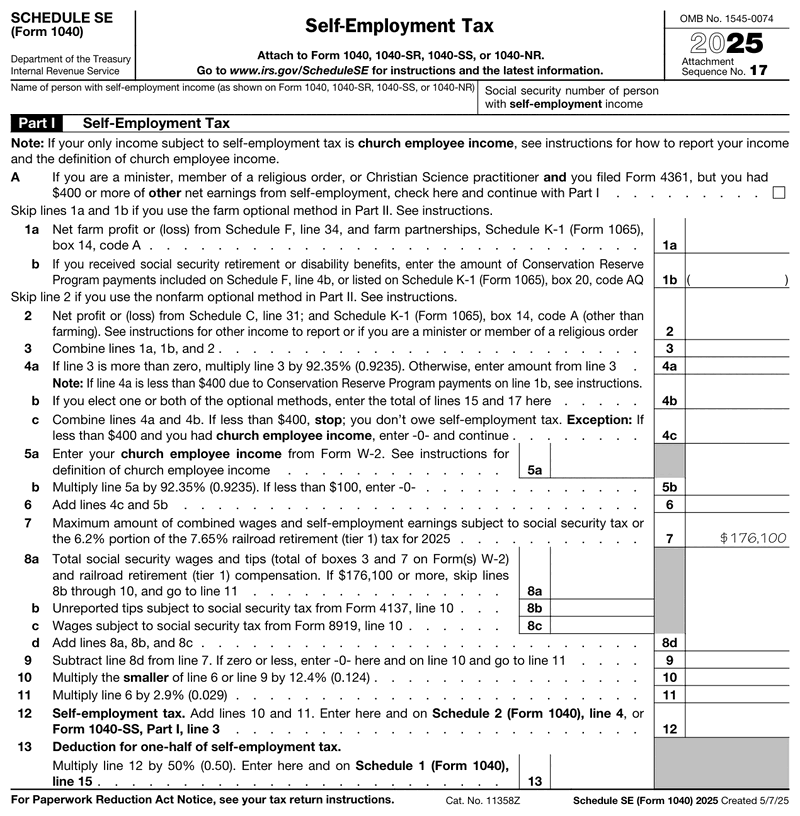
How to Fill Out Schedule SE (Line by Line)
The form runs two pages, but most filers touch a small fraction of it. Work top to bottom and pull each number from the return you've already prepared.
Short vs. Long Version
Most people need only the short path. If all your income comes from ordinary business or freelance work, and you have no church employee income, the short path applies. Compute net earnings, apply the rate, and you're finished. The longer path adds the optional farm and non-farm methods. It applies to a narrow group: farmers and filers with church employee income. It also covers people with low or negative earnings who want to protect Social Security credits. Skip it unless one of those describes you.
Part I, Net Earnings
Line 2 carries your net profit from Schedule C (or Schedule F for farm income). Partners bring their share over from Schedule K-1. Add the sources, then apply the 92.35% adjustment to reach net earnings subject to self-employment tax. If the result lands under $400, you're done and you don't owe.
Part II, The Tax and the Deduction
Most filers wrap this up in under five minutes. Apply 12.4% for Social Security up to the wage base, then 2.9% for Medicare on everything. If you also drew W-2 wages, those count first against the $184,500 base and reduce the room left for the Social Security portion. The total flows to Schedule 2 of your Form 1040, and Line 13 gives you the half-tax deduction. The schedule se instructions cover the edge cases. Always work from the current schedule se form, since the figures shift year to year.
Filing Deadlines and Extensions
This attachment has no deadline of its own. It rides along with Form 1040, so it's due when your return is due. That's April 15 in a normal year. When the 15th falls on a weekend or holiday, the deadline shifts to the next business day.
An extension buys you until October 15, but read the fine print. That extension covers the paperwork, not the payment. Tax you owe is still due at the original April deadline, and interest starts accruing there regardless of the extension.
Quarterly estimates matter more for most self-employed owners. Payments are generally due in April, June, September, and January. Underpay through the year and you can owe a penalty even if you settle the full balance on time.
How to File Self-Employment Taxes
Attach the completed form to your Form 1040 and file them as one package. E-filing is the norm, and most software builds the schedule automatically once Schedule C is done.
Knowing how to file self employment taxes correctly is mostly about sequence. Finish Schedule C, carry the profit forward, then move the tax onto Schedule 2. Keep your calculation backup with the rest of the self employed tax return in case a figure is ever questioned.
Common Filing Mistakes to Avoid
- Skipping the 92.35% adjustment. Applying 15.3% to raw profit overstates the tax and costs real money.
- Ignoring small side income. The $400 threshold is low and counts every source together.
- Missing the Line 13 deduction. Half the tax is deductible, and filers who skip it overpay income tax.
- Using a stale wage base. The cap moves most years. For 2026 it's $184,500, not the prior year's figure.
- Filing Schedule C without the SE attachment. Reporting the profit but never calculating the tax on it invites an IRS notice.
Record-Keeping and Documentation
Keep what supports the numbers: 1099-NEC and 1099-K forms, platform payout summaries, invoices, expense receipts, mileage logs, and the completed schedule. The IRS generally expects records to be available for three years from the filing date, and longer in some situations.
Self-employed owners get asked for income proof more often than employees do. The request usually comes from a lender or a landlord who can't just call a payroll department. Organized records and a consistent self-employed pay stub make those requests routine instead of stressful.
Create Your SE Form With Our Generator
Doing this by hand means multiplying by 92.35%, splitting 12.4% and 2.9%, watching the wage base, then halving the result for the deduction. Each step is a chance to fat-finger a number.
Our generator handles that sequence for you. If you've been hunting for the self employed tax form and want it finished in one pass, this is it. Enter your net profit from Schedule C once and the calculation runs: the adjustment, the rate split, the wage base cap, and the deductible half. You review the completed form, add your signature, and download a clean PDF for your records or your accountant.
Preview the result before you commit. You pay only at download, with no subscription and no recurring charge. Need pay documentation for the same business? You can create pay stubs in a couple of minutes.
Which Tax Year's Schedule SE Do You Need?
Schedule SE is reissued every year, so "schedule se 2025" and "schedule se 2026" point to two different documents, not two names for the same one. Use the version that matches the year the business earned the profit, not the year you sit down to prepare the return. The year matters more on this form than on most 1040 attachments, because the Social Security wage base is printed on the form itself and it sets the ceiling on what the owner owes.
| Tax year | Social Security wage base | Maximum Social Security portion | Return due | With Form 4868 |
|---|---|---|---|---|
| 2025 | $176,100 | $21,836.40 | April 15, 2026 | October 15, 2026 |
| 2026 | $184,500 | $22,878.00 | April 15, 2027 | October 15, 2027 |
The rates themselves do not move between the two years: 12.4% for Social Security up to the base, 2.9% for Medicare with no ceiling, plus the 0.9% Additional Medicare Tax above the threshold. Only the ceiling shifts. Run 2026 earnings through a 2025 form and the capped portion lands on the wrong number, taking the deductible half down with it. Note that the last column moves the filing date only, since SE tax is still due April 15 either way.