
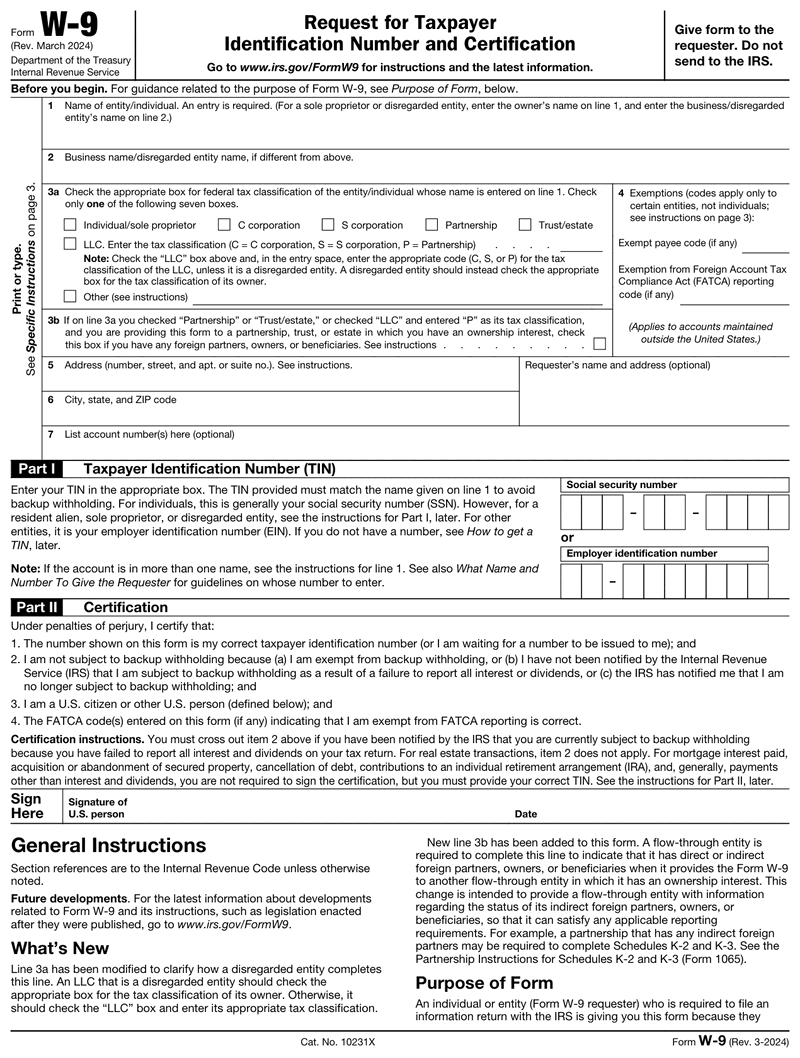



W9 Form at a Glance

  • A W9 gives your business a contractor's legal name and taxpayer identification number, so you can issue a 1099 at year-end.
  • Collect a signed form before the first payment. A missing or incorrect TIN forces you to apply 24% backup withholding.
  • For payments made after 2025, the 1099 reporting threshold rises from $600 to $2,000, so fewer contractor payments trigger a 1099.
  • The official form is still the March 2024 revision. A 2026 update exists only as an IRS draft, so keep collecting the March 2024 version until it is finalized.
  • You can create, e-sign, and download the form online in minutes, then store it for reuse.
blue dollar money icon 100% Money-Back Guarantee

We understand that satisfied customers are loyal customers and we strive to provide you with high quality documents.

blue unlock secure payment icon 100% Secure Payment

Our secure payment method provides you with the utmost security, the ease and the peace of mind you deserve.

blue conversation bubble icon 100% Customer Satisfaction

Having our customers at the core of our business, we make sure that our experienced customer care team is on call 24/7.

Bringing on a new contractor or vendor? You need a complete, signed W9 form on file before the first payment goes out.

Our W9 generator fills, validates, and e-signs the current form online, the same way our pay stub generator handles employee paperwork. Preview free, pay only at download, no subscription.

What Is a W9 Form?

A W9 form is IRS Form W-9, Request for Taxpayer Identification Number and Certification. Your business collects it from contractors and vendors to record their legal name and TIN. You keep the signed form on file and use it to issue a 1099 at year-end.

Think of it as the intake step for every non-employee you pay. The payer (your business) is the requester, and the contractor is the payee. You'll also see it written as Form W9, without the hyphen. A W9 tax form isn't something the signer files with the IRS. You collect it, verify the details, and store it. Common requesters include a business owner hiring help, an accountant onboarding vendors, or an HR team setting up a new freelancer. If a contractor asks what is a W9 tax form, it's this same document seen from their side of the transaction.

Who Needs to Fill Out a W9?

Any US person or business you pay as a non-employee may need to complete a W9. That includes independent contractors, freelancers, vendors, LLCs, and some landlords or attorneys. Collect one before the first payment. Employees fill out a W-4 instead, so a W-9 is for your contractors, not staff.

As the paying business, you decide who gets a request. The rule of thumb is simple. If you'll report their pay on a 1099, get a W-9 first. That covers independent contractors, freelancers you find on Upwork or Fiverr, single-member LLCs, and many service vendors. Corporations are usually exempt from 1099 reporting, though attorneys are a notable exception. When a payment crosses the annual reporting threshold, the form has to already be on file. Chasing a signature after the fact is how businesses end up applying backup withholding or missing a deadline.

What Information the W9 Form Collects

Every W9 form asks for the same seven pieces of information. Our W9 generator collects them in the same order, so the tool mirrors the paper form:

  • Legal name of the individual or entity.
  • Business name or DBA, if it differs from the legal name.
  • Federal tax classification (sole proprietor, partnership, C corp, S corp, or LLC).
  • Exemption codes, including any backup withholding or FATCA exemption.
  • Address where tax documents should be sent.
  • Taxpayer Identification Number, which is a Social Security number (SSN) for individuals or an EIN for businesses.
  • Signature and date, certifying the information is correct.

Getting the tax classification box right matters most. It drives how the IRS treats the payments and whether backup withholding applies. If a vendor hands you an EIN that doesn't match the name they gave you, our EIN lookup guide covers how to confirm it before you pay.

Form W-9 or Form W-4 — At a Glance

Form W-9
  • Contractor and vendor paperwork
  • Gives a payer your TIN for year-end 1099s
  • No tax is withheld along the way
  • Kept on file by the requester, never sent to the IRS
Form W-4
  • Employee paperwork
  • Sets federal withholding on each paycheck
  • Tax comes out of every pay run
  • Kept on file by the employer

Form W-9 Deadlines

WhatWhenWorth knowing
Provide to the requester Before the first payment No valid W-9 on file means 24% backup withholding
Update your details Whenever they change Name, entity type, address or TIN changes need a fresh form
IRS filing Never The W-9 stays with the requester — it is not filed with the IRS

Why Make Your Form W-9 Here?

Guided fields

Plain-English questions in the order the form expects them, with format checks as you type.

Automatic math

Totals, taxes and carryovers calculate themselves. No arithmetic, no transposition errors.

Print-ready PDF

Preview the finished document free, then download it the moment your payment goes through.

Form W-9 preview

How Do I Create My Form W-9?

  • Enter your details

    Answer guided, plain-English fields. The math is calculated for you.

  • Preview your form

    Check a live preview of the finished document before you pay.

  • Download your PDF

    Get a print-ready PDF the moment your payment goes through.

What
people
say

5.0 Rating

559 Reviews

white tick in green background icon Verified User
smiley-face Mark Patterson

Fast - Easy

Published May 05, 2023
white tick in green background icon Verified User
smiley-face Sharolene Bantaculo

they are very helpful.

Published Jul 22, 2023
white tick in green background icon Verified User
smiley-face Todd Osgood

Excellent service and provides me with what I need for my techs

Published May 01, 2023
white tick in green background icon Verified User
smiley-face Sherry Logan

Paystubs.net is the best! They take care of all my pay-stub needs.

Published May 26, 2023
white tick in green background icon Verified User
smiley-face Ashley Brandt

Excellent

Published Jun 10, 2023

Everything To Know About Form W-9


How to Fill Out a W9 Form (Line by Line)

Filling out a W9 form takes a few minutes once you know which boxes apply. If you'd rather not print anything, our fillable W9 walkthrough shows the same fields on screen. Walk the lines in order.

Name and Business Name

Enter your legal name on line 1. If you operate under a DBA, or your LLC uses a separate name, add it on line 2.

Tax Classification

Check one box. This is where most mistakes happen. Three common cases show how it works:

  • A sole proprietor uses their own name and SSN.
  • A single-member LLC that hasn't elected corporate status is a disregarded entity, so it usually uses the owner's SSN or EIN.
  • An S corp checks the S corporation box and uses its EIN.

Finishing the Form

People rush this part, so slow down. Enter the mailing address for tax documents, add your SSN or EIN, then sign and date to certify the details. Before sending it, double-check three things: the right classification box, a current TIN, and a real signature. If you incorporated recently, use your new EIN, not the personal SSN it replaced. And check that the copy in play is the current March 2024 revision.

Create and E-Sign a W9 Online

You don't need to print anything. Our W9 generator lets you enter the details, validate them, e-sign, and download a clean PDF in minutes. The IRS accepts an electronic signature on the form, so a digital signature holds up the same as ink.

Here's a practical tip if you onboard contractors regularly. Save each completed W9 PDF to a shared drive the moment it comes back, filed under the contractor's name. When 1099 season arrives you're pulling stored files instead of chasing signatures.

Need the paperwork two ways? You can download a blank W9, grab the W-9 form PDF for your records, or generate a completed one to send right now. Either way, you preview the result first and pay only at download, with no subscription. If you'd rather start from a layout for other documents, browse our pay stub templates. Ready to handle it now? Fill in the form above and skip the printer entirely.

Collecting and Managing W9s for Your Business

Smart businesses make the W-9 part of vendor setup, not a year-end scramble. Add it to your onboarding checklist and request one before you release any payment.

You've probably sent your own W-9 more than once. Common requesters include a marketplace like Upwork or Fiverr, a bank opening a business account, or a property manager reporting rental income. On the other side of that exchange, your business is the requester, and the same discipline applies.

Keep each signed IRS W9 on file in one secure place. If you run contractor payments through QuickBooks or FreshBooks, a W-9 already on file lets the software generate 1099-NECs at year-end without a last-minute chase. When you need to produce those forms yourself, our 1099 generator builds them from the same details. And if you also pay W-2 staff, keeping their wage documentation in the same system spares you a second year-end scramble. Refresh a form only when a contractor's name, address, or TIN changes.

Backup Withholding and a Missing W9

Here's what happens when a W9 is missing or wrong. If a contractor won't provide a valid TIN, the IRS requires you to withhold 24% of their payments as backup withholding and send it in. That's money out of their check and extra work for you.

File 1099s with missing or incorrect TINs and you can draw penalties too, plus a CP2100 or CP2100A notice from the IRS flagging the mismatch. Neither is fun to unwind.

So why does backup withholding exist? It guarantees the IRS can still collect tax on income even when a payee's TIN is missing or incorrect. Collecting a complete W-9 up front, then verifying the TIN, is the simplest way to keep that 24% out of the picture.

What's New for the 2026 W9 Form

Here's the part that trips people up. The official form is still Form W-9 (Rev. March 2024), so there is no finalized 2026 W9 sitting on the IRS site waiting to be downloaded. Search for a W9 form 2026 download and you'll land on the March 2024 revision, which is the correct one to use. What changed for 2026 is the reporting math around the form, not the form itself.

The big one is the threshold. For payments made after December 31, 2025, the 1099 reporting threshold rises from $600 to $2,000, and it gets indexed for inflation after 2026. Note this is the 1099 reporting threshold, not a change to the 24% backup withholding rate. Fewer contractor payments will trigger a 1099, but you still collect a W9 from everyone up front, because in January you don't know who will cross $2,000 by December.

The IRS has also circulated a draft W-9 form 2026 revision, dated June 2026, that adds a Part II certification checkbox for US digital asset brokers. It is still a draft and could change before release. Until the IRS finalizes it, don't treat that version as required, and don't reject a properly signed March 2024 form for looking out of date.

So the takeaway for your records is short. Collect the current March 2024 revision, watch for the final W9 2026 release, and re-paper your contractors only once the IRS actually publishes it.

W9 vs. W-4, W-8, and 1099

It's easy to mix up the forms in this family. Here's how they line up:

Form Who uses it Purpose
W-9 US contractors and vendors Give the payer a legal name and TIN
W-4 Employees Set income tax withholding from wages
W-8 Non-US persons Certify foreign status for withholding
1099 The paying business Report what you paid a contractor

The short version is simple. You collect a W-9 from US contractors and a W-8 from non-US ones. Employees give you a W-4. The W-9 data is what you eventually turn into a 1099. Still not sure whats a W9 versus a W-4? A W9 covers contractors, while a W-4 covers staff on your payroll. For an employee-versus-contractor breakdown, see W-9 vs W-2, and if you're choosing which form to file, compare 1099-MISC vs 1099-NEC.

Is There a Separate W9 for 2025 or 2026?

Worth clearing up before you chase a year-specific version: the W9 is not an annual form. The IRS does not reissue it each tax year the way it does a W2 or a 1099. The current revision is dated March 2024, and it is the right form to collect in 2025, 2026 and beyond.

That means a search for w9 form 2025, w9 form 2026 or w9 form 2024 lands on the same document. If you are collecting these from contractors, the version is rarely the problem. What matters is whether the information is current.

Situation Do you need a new W9?
Contractor's details unchanged No, the one on file still stands
Name, business name or address changed Yes, collect a fresh one
Taxpayer ID or tax classification changed Yes, collect a fresh one
New tax year, nothing else changed No

Keep each completed W9 with the tax year you paid that contractor, since that is the year the 1099 will report.

Form W-9 Questions, Answered

Is a W9 the same as a 1099?

No. A W9 collects a contractor's name and TIN so you have the details on file. A 1099, usually the 1099-NEC, is what your business files later to report how much you paid that contractor. The W9 feeds the 1099. They work together but are separate forms.

Do I need to collect a new W9 every year?

No. A W9 stays valid until the contractor's information changes, such as a new business name, address, or TIN. Ask for an updated form only when something changes or the certification no longer holds. Keeping current forms on file makes year-end 1099 filing accurate and fast.

What happens if a contractor won't give me a W9?

If a contractor refuses or gives an invalid TIN, the IRS requires your business to apply 24% backup withholding on their payments and remit it. You can also face penalties for filing 1099s with missing or incorrect TINs. Request the form in writing before you release any payment.

Is an electronic signature on a W9 valid?

Yes. The IRS accepts electronic signatures on Form W-9 as long as the process confirms the signer's identity and intent. A contractor can complete and e-sign the form online, and you can store the signed PDF digitally instead of collecting a printed, hand-signed copy.

Does my business file the W9 with the IRS?

No. The W-9 isn't filed with the IRS. Your business keeps it on record and uses the name and TIN it provides to prepare information returns like the 1099-NEC. Store each signed form securely, since you may need it if the IRS questions a filing.

Preview free, pay at download.

No subscription — you pay per document, only when you download.

  • Guided fields with automatic math
  • Free live preview before any payment
  • 100% money-back guarantee
Experiencing a problem?

Fill out our contact form and we will get back to you soon.

Contact Us
Lost your order?

No need to panic! You can resend your order for free.

Resend Your Order

Jaden Hi! How can I help you?

Hello from our chat team!

To best assist you, please fill out the form, and we'll get back to you swiftly.
Start the chat