
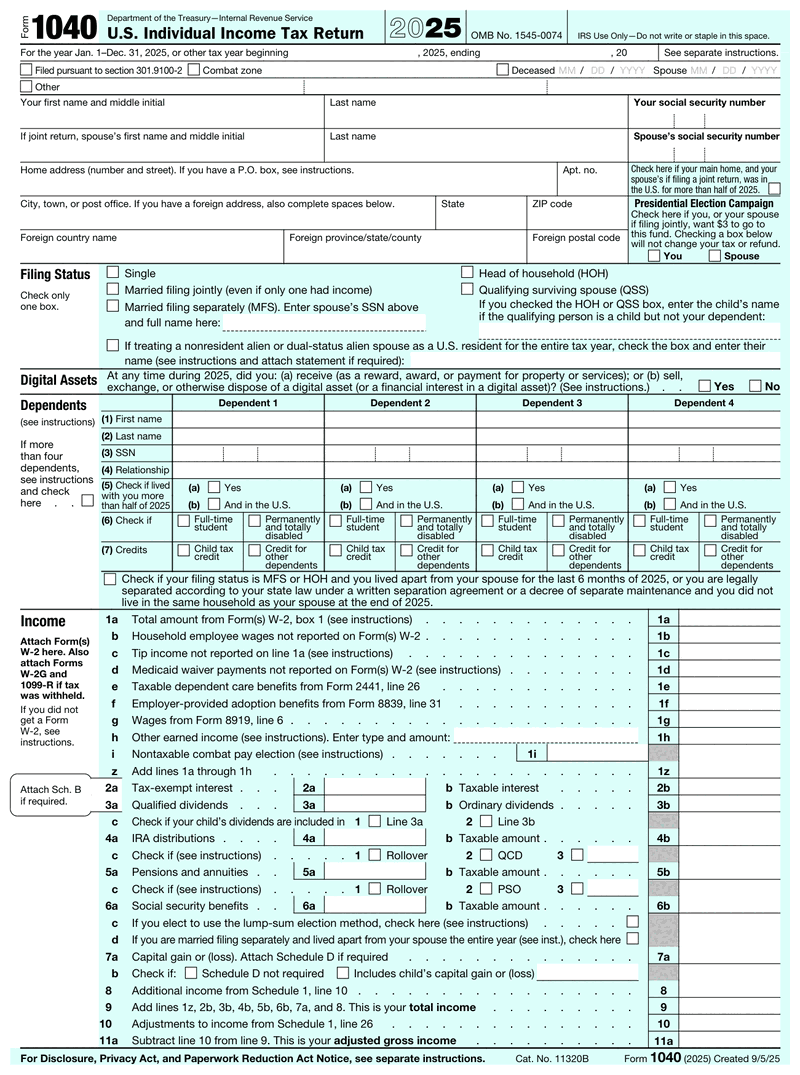



1040 Form at a Glance

  • Form 1040 is the IRS form individuals use to file a federal income tax return each tax year.
  • Most U.S. citizens and residents above the income threshold for their filing status must file one.
  • Schedules 1, 2, and 3 attach to Form 1040 to report extra income, additional taxes, and credits.
  • Form 1040-SR is a large-print version built for taxpayers 65 and older.
  • Paper filers use a state-specific IRS address, while e-filers submit online for a faster refund.
blue dollar money icon 100% Money-Back Guarantee

We understand that satisfied customers are loyal customers and we strive to provide you with high quality documents.

blue unlock secure payment icon 100% Secure Payment

Our secure payment method provides you with the utmost security, the ease and the peace of mind you deserve.

blue conversation bubble icon 100% Customer Satisfaction

Having our customers at the core of our business, we make sure that our experienced customer care team is on call 24/7.

You run the business, so your federal return pulls in self-employment income, deductions, and estimated taxes. Getting it right protects you.

Our 1040 form generator fills and formats your return online. Preview free, pay only when you download, no subscription.

What Is a 1040 Form?

Form 1040 is the standard IRS form individuals use to file a federal income tax return. It reports your income for the tax year, applies deductions and credits, and calculates whether you owe tax or are due a refund. Nearly every U.S. taxpayer files some version of the 1040 form.

Think of the 1040 form as the master summary of your tax year. Wages, self-employment profit, interest, and investments all land here. So do the adjustments, deductions, and credits that lower your bill.

The IRS retired the old 1040A and 1040EZ back in 2018, so today there's one core form with attached schedules for anything extra. That structure keeps the main return short while still handling complex situations. If your taxes are simple, you may only need the two-page form and nothing else.

Who Needs to File Form 1040?

Most U.S. citizens and residents whose income exceeds the threshold for their filing status must file Form 1040. Thresholds track the standard deduction and change each tax year. If you're self-employed and net $400 or more, you must file regardless of total income.

Beyond the basic income test, other triggers apply. You generally need to file if you owe special taxes, received advance premium tax credits, or want a refund of withheld tax. Your filing status (single, married filing jointly, head of household, and so on) sets the number that matters for you.

When in doubt, file. A return costs you little and often returns money you already paid in.

What You Need Before You Start

Gather your paperwork first. A few minutes of prep saves you from stopping halfway to hunt for a number.

  • W-2s from every employer
  • 1099s for contractor or freelance work, interest, dividends, or retirement income
  • Your prior-year adjusted gross income (the IRS uses it to verify e-filed returns)
  • Social Security numbers for you, your spouse, and dependents
  • Records for deductions and credits (mortgage interest, tuition, childcare)

Here's a detail most filers miss: check Box 1 of your W-2 form against your year-end pay stub before you enter wages on Line 1a. They will not match your YTD gross, and that is normal: Box 1 is gross pay minus pre-tax items like 401(k) deferrals and health premiums. What you are looking for is a gap you cannot explain from those deductions. Because we build income documents, we see this error constantly, and it's avoidable.

A good habit: save a PDF of every pay stub as it's issued instead of reconstructing income from memory in April. Need clean wage records to check against your W-2? Our pay stub generator keeps your gross and net totals organized year-round.

Standard deduction or Itemized deductions — At a Glance

Standard deduction
  • A flat amount set by filing status
  • No receipts or records needed
  • What most filers take since 2018
  • Claimed directly on the 1040
Itemized deductions
  • Mortgage interest, SALT, charity, medical
  • Requires records for every entry
  • Worth it when the total beats the flat amount
  • Claimed on Schedule A

Form 1040 Deadlines

WhatWhenWorth knowing
File your return and pay tax due April 15, 2027 Shifts a day or two for weekends and holidays
Extended filing deadline (Form 4868) October 15, 2027 Extension to file — payment stays due in April
Quarterly estimated payments Apr 15 · Jun 15 · Sep 15 · Jan 15 Only when income has no withholding

Why Make Your Form 1040 Here?

Guided fields

Plain-English questions in the order the form expects them, with format checks as you type.

Automatic math

Totals, taxes and carryovers calculate themselves. No arithmetic, no transposition errors.

Print-ready PDF

Preview the finished document free, then download it the moment your payment goes through.

Form 1040 preview

How Do I Create My Form 1040?

  • Enter your details

    Answer guided, plain-English fields. The math is calculated for you.

  • Preview your form

    Check a live preview of the finished document before you pay.

  • Download your PDF

    Get a print-ready PDF the moment your payment goes through.

What
people
say

5.0 Rating

559 Reviews

white tick in green background icon Verified User
smiley-face Mark Patterson

Fast - Easy

Published May 05, 2023
white tick in green background icon Verified User
smiley-face Ashley Brandt

Excellent

Published Jun 10, 2023
white tick in green background icon Verified User
smiley-face Jesse Rodriguez

Very quick and easy to use. Fair pricing.

Published May 30, 2023
white tick in green background icon Verified User
smiley-face James Oliver

Great

Published Apr 22, 2023
white tick in green background icon Verified User
smiley-face Sherry Logan

Paystubs.net is the best! They take care of all my pay-stub needs.

Published May 26, 2023

Everything To Know About Form 1040


How to Fill Out a 1040 Form (Step by Step)

Working through Form 1040 is easier when you follow the lines in order. Here's the path from top to bottom, with the line numbers you'll actually use.

  • Enter your personal details and filing status. Name, address, and Social Security number go at the top, along with your filing status and any dependents.
  • Report your income. List wages on Line 1a, then add interest, dividends, business income, and other sources. Total income lands on Line 9.
  • Apply adjustments. Subtract above-the-line adjustments on Line 10 to reach your adjusted gross income (AGI) on Line 11.
  • Take your deduction. On Line 12, claim the standard deduction or your itemized total. For the 2025 return most people are filing now, the standard deduction is $15,750 (single), $31,500 (married filing jointly) and $23,625 (head of household). For tax year 2026 those rise to $16,100, $32,200 and $24,150, so take the figures from the year printed on your form.
  • Find taxable income. After the deduction, Line 15 shows your taxable income, the figure your tax is actually calculated on.
  • Calculate tax and settle up. Line 24 shows total tax. Compare it to the payments and withholding you've already made to see your tax refund or the amount you owe.

If a line references another form, that's where the schedules come in. The IRS Form 1040 instructions booklet explains every line in detail. For quick lookups, the shorter 1040 instructions summary covers the most common entries, so keep one handy for anything unusual.

Form 1040 Schedules 1, 2, and 3

Schedules are add-on pages that report anything the two-page Form 1040 doesn't have room for. Most filers need none of them. Others need one or two.

Schedule 1: Additional Income and Adjustments

Use Schedule 1 for income like business profit, unemployment, or capital gains, plus above-the-line adjustments such as the self-employment tax deduction and student loan interest. The totals flow back to your main return.

Schedule 2: Additional Taxes

This page captures additional taxes beyond regular income tax: the alternative minimum tax, self-employment tax, and household employment taxes. Business owners paying self-employment tax will almost always touch it.

Schedule 3: Credits and Payments

This is where nonrefundable tax credits and other payments go, including the foreign tax credit, education credits, and estimated payments you made during the year. It's how you claim money back that isn't withholding.

Schedule 1-A: New 2025 Deductions

New for the 2025 tax year, Schedule 1-A covers four deductions from recent legislation: No Tax on Tips, No Tax on Overtime, No Tax on Car Loan Interest, and the Enhanced Deduction for Seniors. If any apply to your household, this schedule is worth a close read.

AGI vs. MAGI: What's the Difference?

Adjusted gross income (AGI) is your total income minus specific adjustments, shown on Line 11 of Form 1040. Modified adjusted gross income (MAGI) adds certain items back, such as tax-exempt interest. MAGI isn't a line on the form; it determines eligibility for credits and deductions.

So what is modified adjusted gross income in practice? Start with your AGI, then add back things like tax-exempt interest, excluded foreign income, and certain deductions. The result is your MAGI.

Why it matters: MAGI is the number that governs eligibility thresholds. It decides whether you can deduct a traditional IRA contribution, qualify for the ACA premium tax credit, or claim the student loan interest deduction. Two people with the same AGI can land on opposite sides of a phase-out once MAGI add-backs are counted.

Other 1040 Form Types: 1040-SR, 1040-ES, and More

The core return comes in several versions built for specific situations. Knowing which 1040 form you need avoids filing the wrong one.

Form 1040-SR (For Seniors)

Form 1040-SR (also written 1040 SR or 1040sr) is designed for taxpayers 65 and older. It uses larger print and an easier-to-read layout, and it includes an embedded standard deduction chart right on the form. The tax math is identical to the standard Form 1040, so there's no downside to using it if you qualify. Seniors may also claim the Senior Bonus Deduction, an extra $6,000 deduction available for tax years 2025 through 2028.

Other Variants

  • Form 1040-ES: used to calculate and pay quarterly estimated taxes.
  • Form 1040-X: used to amend a return you already filed.
  • Form 1040-NR: used by nonresident aliens with U.S. income.
  • Form 1040-V: a payment voucher you send with a check.

Each variant attaches to or replaces part of the standard filing, so match the form to your situation before you start.

Form 1040 for the Self-Employed and Business Owners

If you run a business, your Form 1040 does more work. Business income doesn't arrive on a W-2, so you report it yourself and cover the taxes an employer would normally split with you.

  • Schedule C reports your business profit or loss, which then flows into Schedule 1 and up to your main return.
  • Schedule SE calculates self-employment tax (Social Security and Medicare), which carries to Schedule 2.
  • Form 1040-ES handles the quarterly estimated payments you make so you aren't hit with a penalty at filing time.

Recordkeeping is where owners either save or lose money. Keep every 1099-NEC, receipt, and self-employed pay record organized throughout the year. If you also draw a W-2 wage from your own company, treat those pay stubs as source documents. Reconcile them before they hit the return.

Where to Mail Your Form 1040

The correct mailing address for a paper Form 1040 depends on your state and whether you're enclosing a payment. The IRS lists current addresses on its "Where to File" page. E-filing avoids mailing entirely and delivers a faster refund.

If you file on paper, where to mail federal tax return documents comes down to two variables. The first is the state you live in. The second is whether a check is attached. The addresses change periodically, so always confirm against the official IRS Where to File list rather than reusing last year's envelope.

Most filers are better off e-filing. It confirms receipt, reduces math errors, and speeds up any refund. Paper remains available if you prefer it or your situation requires it.

Create Your 1040 Form Online

You don't have to wrestle with a blank PDF. Our 1040 generator walks you through each field, applies the right formatting, and produces a clean, print-ready return you can download.

The tool is built for people who value their time: guided entry, clear labels, and no software to install. It's part of the same toolkit as our online paystub generator, so your income documents stay in one place. Pricing is simple too. Preview your form free, and pay only when you download it, with no subscription.

Ready to skip the manual formatting? Generate your 1040 form and download it in minutes.

Which Tax Year Form 1040 Do You Need?

Form 1040 is reissued every year, so "1040 form 2025" and "1040 form 2026" are genuinely two different documents. The year printed on the form is the year you earned the income, not the year you file. Filing right now means you want the 2025 form.

Tax year 2025 (filed 2026) Tax year 2026 (filed 2027)
Filing deadline April 15, 2026 April 15, 2027
Extended deadline (Form 4868) October 15, 2026 October 15, 2027
Standard deduction, single $15,750 $16,100
Standard deduction, married filing jointly $31,500 $32,200
Standard deduction, head of household $23,625 $24,150
State and local tax cap $40,000 ($20,000 married filing separately) $40,400 ($20,200 married filing separately)

Form 4868 moves the filing date to October, never the payment date: your balance is still due April 15. Owners living abroad get an automatic two months to June 15 without filing 4868 at all. The 2026 state and local tax cap is reduced once MAGI passes $505,000 ($252,500 if married filing separately) and never drops below $10,000 ($5,000 married filing separately).

One caution before you plan 2026 around a form you have not seen: the IRS has not posted a draft 2026 Form 1040, so line-level changes for that year cannot be confirmed yet.

Form 1040 Questions, Answered

Do I need to file a 1040 form if I only have W-2 income?

Usually yes. If your W-2 wages exceed the filing threshold for your status, you must file Form 1040. Even below the threshold, filing is worth it when taxes were withheld, since filing is the only way to claim your refund.

What is modified adjusted gross income (MAGI)?

Modified adjusted gross income is your AGI with certain deductions added back, such as tax-exempt interest and excluded foreign income. It never appears as a line on the form. Instead, the IRS uses MAGI to set eligibility limits for credits, IRA deductions, and other tax benefits.

Where do I mail my federal tax return?

It depends on your state and whether you're including a payment. The IRS assigns different processing centers by region, so check the official "Where to File" page for the address that matches your situation. E-filing skips the mailing step and processes faster.

What is the difference between Form 1040 and Form 1040-SR?

The tax calculation is identical. Form 1040-SR simply uses larger type and includes an on-form standard deduction chart, making it easier to read for taxpayers 65 and older. If you qualify by age, either form produces the same result.

What documents do I need to fill out Form 1040?

Gather your W-2s, any 1099s, last year's AGI, Social Security numbers for everyone on the return, and records for deductions or credits. Confirm your W-2 Box 1 wages match your year-end pay stub before entering them, which prevents a common filing error.

Preview free, pay at download.

Accurate income records make all of it faster. Before you file, use our pay stub generator to keep your wage and YTD totals organized. Then the numbers on your 1040 form match your records the first time.

No subscription — you pay per document, only when you download.

  • Guided fields with automatic math
  • Free live preview before any payment
  • 100% money-back guarantee
Experiencing a problem?

Fill out our contact form and we will get back to you soon.

Contact Us
Lost your order?

No need to panic! You can resend your order for free.

Resend Your Order

Jaden Hi! How can I help you?

Hello from our chat team!

To best assist you, please fill out the form, and we'll get back to you swiftly.
Start the chat