








How to Create a 941 Form Online
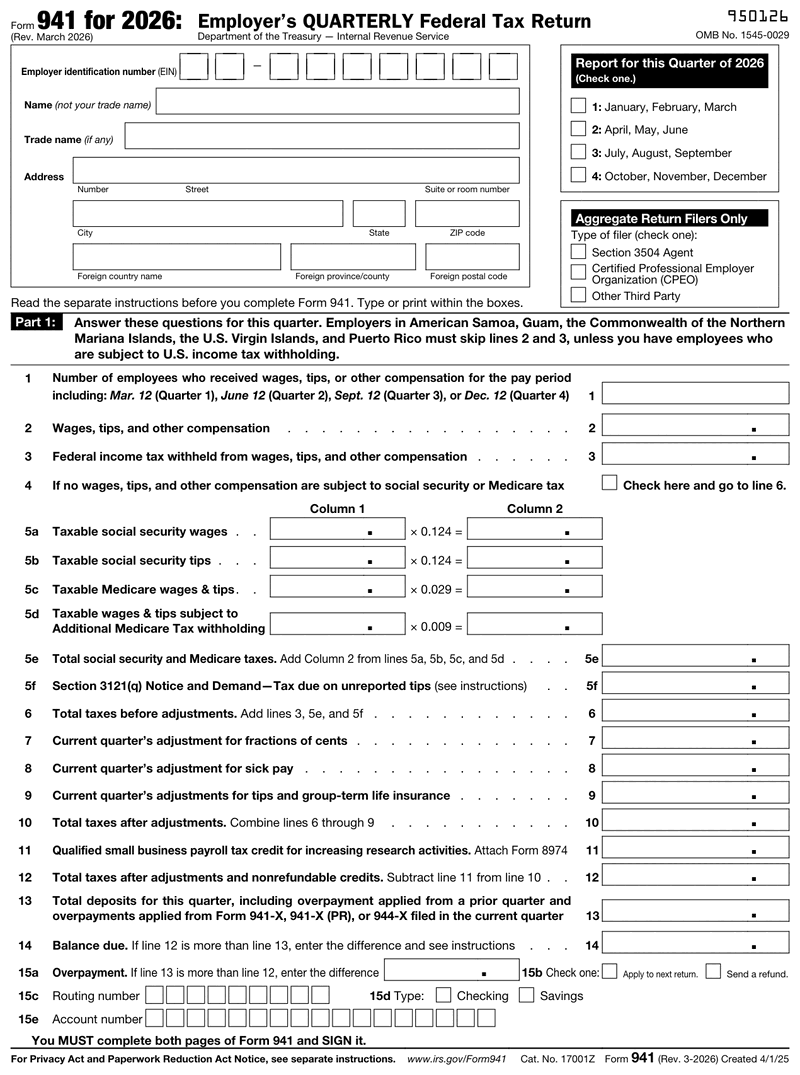
Our 941 generator walks the return in the same order the IRS lays it out, so nothing you enter has to be translated later. You supply quarterly totals and the tool handles the arithmetic, including the Social Security and Medicare calculations that cause most manual errors.
Gather three things before you start:
- Your EIN and legal business name exactly as registered with the IRS.
- Quarterly totals for gross wages, federal income tax withheld, and taxable Social Security and Medicare wages.
- Total federal tax deposits for the quarter, plus the prior quarter's Line 12 figure.
That last item matters more than it looks. The prior quarter's Line 12 total determines whether you can pay a small balance with the return or must deposit it separately, and having it ready saves a trip back into the instructions mid-form.
If you already run payroll software, pull these from your quarterly tax liability report rather than adding up individual stubs. When you need the underlying employee documentation too, you can generate it from our pay stub templates using the same payroll data.
Form 941 Instructions: Line by Line
The full IRS Form 941 instructions run dozens of pages. Here is what the return actually asks for, in plain English. It has five parts: Part 1 is the quarterly numbers, Part 2 your deposit schedule, Part 3 business status, Part 4 a third-party designee, and Part 5 the signature.
Lines 1 Through 6: Headcount, Wages, and Base Tax
Line 1 is your employee count for the pay period including the 12th of the quarter's last month, not total headcount for the whole period. Line 2 is gross wages, tips, and other compensation. Line 3 is federal income tax withheld from those wages. Line 4 is a checkbox for the rare case where no wages were subject to Social Security or Medicare tax.
Lines 5a through 5d hold the FICA math: taxable Social Security wages, Social Security tips, Medicare wages and tips, and wages subject to Additional Medicare Tax. Each carries a fixed multiplier printed on the form. Line 5e totals them, and Line 5f covers tax on unreported tips if the IRS issued a Section 3121(q) notice. Line 6 adds Lines 3, 5e, and 5f into total tax before adjustments.
Lines 7 Through 12: Adjustments and Credits
Lines 7, 8, and 9 are correction lines for fractions of cents, third-party sick pay, and tips plus group-term life insurance. They are usually tiny, and they are where rounding differences get squared away. Line 10 gives total taxes after adjustments.
Line 11 is the qualified small business payroll tax credit for increasing research activities, claimed with Form 8974. Most employers leave it blank. Line 12 is the number that matters most: total taxes after adjustments and credits.
Lines 13 Through 15: Deposits and Balance
Line 13 is everything already deposited for the quarter. Line 14 is your balance due if deposits fell short. Line 15 is your overpayment, which you can apply forward or request as a refund.
If Line 12 comes in under $2,500 for the quarter, you can pay the balance with the return instead of depositing separately. Above that, deposits follow your assigned schedule, and paying with the return can trigger a penalty even when the return is on time. Reviewing common payroll mistakes before filing is cheap insurance.
Schedule B (Form 941): Who Actually Needs It
Schedule B (Form 941) is a daily record of your tax liability, not an extra tax. You attach it to the 941 form only if you are a semiweekly depositor, or if you accumulate $100,000 or more in liability on any single day. Monthly depositors skip it entirely.
Your deposit schedule comes from a lookback period, the four quarters ending June 30 of the prior year. Report $50,000 or less of employment tax in that window and you are a monthly depositor. Report more and you become a semiweekly depositor for the whole next calendar year. Semiweekly is what triggers 941 Schedule B.
The distinction confuses people because the form 941 Schedule B attachment does not change what you owe. It shows the IRS when each liability arose, day by day, so the agency can confirm deposits landed on schedule. Monthly depositors record the same information in Part 2 of the base return, which is why they never touch the schedule B form 941 attachment.
Where to Mail Form 941
The Form 941 mailing address depends on two things: your business location and whether you are enclosing a payment. Returns with a payment go to a different IRS address than returns without one. Because these addresses change, check the current list in the IRS Form 941 instructions before mailing.
That payment split is what most employers miss. The IRS routes returns with a check to a lockbox facility and returns without one to a service center, so the same business in the same state uses two different addresses depending on the quarter. Looking up where to mail 941 forms once and reusing that address every quarter is how returns end up at the wrong facility.
So when you check where to mail form 941, confirm both variables each time: your state and your payment status. If you are searching specifically for where to mail 941 without payment, that is the service center address, listed separately for exactly this reason. Anyone who pays electronically and mails the return is always in the without-payment column, even though money did change hands.
Mail the 941 form certified with return receipt. A paper return has no acknowledgment trail otherwise, and proof of timely mailing is what protects you if the IRS says it never arrived.
E-Filing vs. Mailing Form 941
You can file 941 online through the IRS e-file system, an authorized e-file provider, or your payroll provider. E-filing returns an electronic acknowledgment, faster and easier to document than certified mail, and it removes the address question entirely.
Paper filing stays fully valid. The trade-off is proof: electronic filing timestamps itself, while paper puts the burden of evidence on you. Either way, deposits are made separately through EFTPS. Filing the return is not the same as paying the tax.
Penalties for Filing Form 941 Late
The IRS charges 5% of unpaid tax for each month or part of a month the return is late, capped at 25%. A separate late payment penalty runs 0.5% per month and can rise to 1% after a notice of intent to levy. Interest accrues on top of both.
Note what those percentages apply to: unpaid tax. File late owing nothing and the failure-to-file penalty has little to work with. Which leads to the most useful rule here: file on time even when you cannot pay in full, then arrange payment separately. Filing late and paying late stacks two penalties where one was avoidable.
Late deposits carry their own schedule, running 2% to 15% depending on how far past due. Deposit penalties are assessed independently of the return, which is why a business can file a perfect 941 form and still get a notice.
Managing 941 Form Filing as Your Payroll Grows
The quarterly return gets harder as headcount rises, and it is rarely the arithmetic that causes trouble. It is that the rules change underneath you.
Your deposit schedule moves first. Cross $50,000 in the lookback period and you shift from monthly to semiweekly for the entire next calendar year, Schedule B starts applying, and deposit deadlines tighten. The IRS notifies you, but the change takes effect on their calendar, not whenever you read the notice. Check your lookback total annually rather than assuming last year's schedule carries forward.
Build the quarter-end close into a routine. Pull the quarterly tax liability report from QuickBooks, Gusto, ADP, or whichever platform runs your payroll, reconcile it against deposit records, then file. Those reports exist because they map to the 941 form, so rebuilding the numbers by hand from individual stubs is wasted effort.
Keep records at least four years: the filed return, deposit confirmations, and the payroll register behind each quarter. If the IRS questions a filing, the register reconciles reported wages to actual paychecks. Understanding how payroll deductions work across your team makes those quarterly totals far easier to verify.
Which Form 941 Revision Do You Need?
Searching "941 form 2025" or "941 form 2026" is a fair question here, because Form 941 genuinely is reissued each year. The face of the return reads "Form 941 for 2026 (Rev. March 2026)" and carries a "Report for this Quarter of 2026" checkbox you tick every filing. The year in your search names the calendar year of the payroll you are reporting, and your revision has to match it.
| Payroll you are reporting | Revision to file | Social Security wage base |
|---|---|---|
| 2025 wages | Rev. March 2025 | $176,100 |
| 2026 wages | Rev. March 2026 | $184,500 |
Use the March 2026 revision for the first quarter of 2026; the IRS expects that same revision to also be used for the second, third and fourth quarters of 2026.
Two things are new on the 2026 return. A page-1 box, "Aggregate Return Filers Only, Type of filer," asks you to identify as a Section 3504 agent, CPEO, or other third party. And lines 15c, 15d and 15e collect routing number, account type and account number so an overpayment can be direct deposited. Lines 1 through 15b run exactly as they did in 2025, and balance due payments must now be made electronically.