








What's New on the 2026 W4 Form
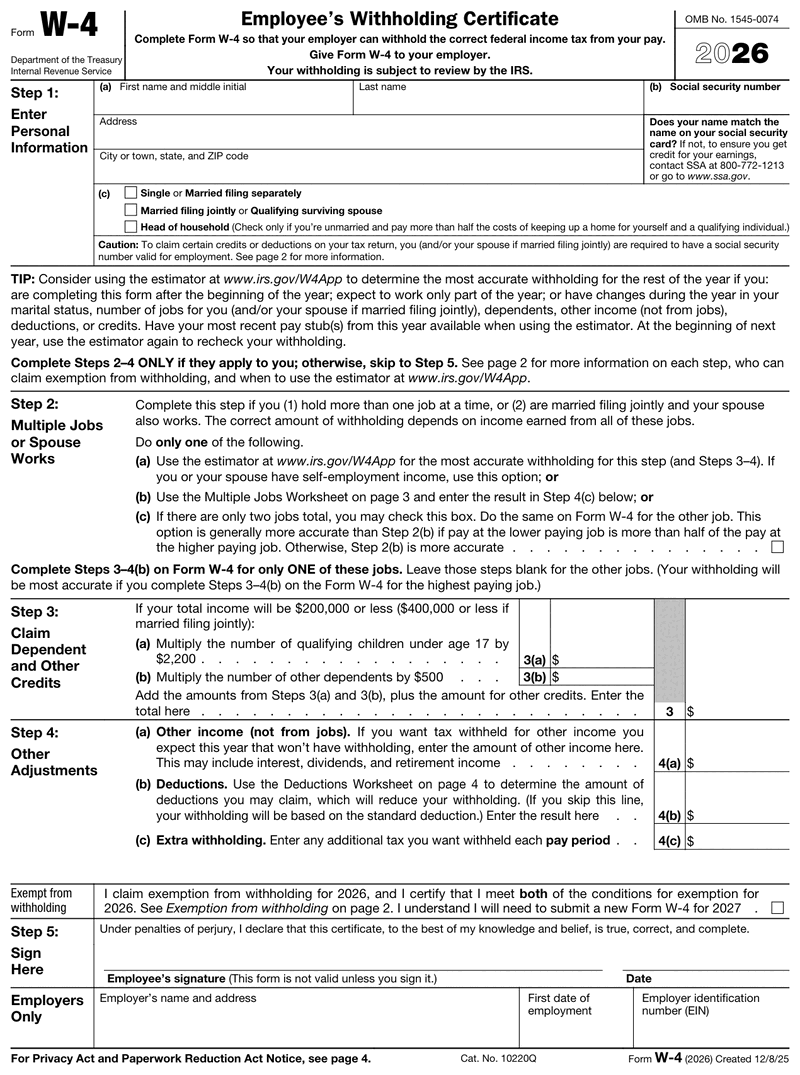
If you've heard the W-4 hasn't changed since 2021, that's out of date. The W4 form 2026 was materially revised, and using an old version will throw off your withholding.
Here is what changed on the 2026 form, confirmed against the live IRS form:
- It's now five pages. The core form is still short, but the instructions and worksheets expanded.
- Step 3 credits. You multiply qualifying children under age 17 by $2,200 (up from $2,000) and other dependents by $500, for employees whose income is $200,000 or less, or $400,000 or less if married filing jointly.
- Step 4 is no longer labeled optional. If an employee skips the deductions line, 4(b), their withholding defaults to the standard deduction.
- New tips and overtime lines. The Deductions Worksheet now has lines for qualified tips (up to $25,000) and qualified overtime compensation, reflecting the 2025 tax law known as the One Big Beautiful Bill Act. Those amounts flow into Step 4(b).
- A new exempt checkbox sits after Step 4, so an employee who qualifies can claim exemption by checking one box and completing only Steps 1 and 5.
The W-4 2026 update traces back to that same 2025 tax law, so the numbers matter. For payroll, the takeaway is simple: always issue the current 2026 W-4 form to new hires, because a 2026 W-4 and a 2021 version don't calculate the same way. When in doubt about the W4 2026 layout, pull the form fresh from IRS.gov or generate a current one.
How to Fill Out a W4 Form
To fill out a W4 form, complete Step 1 with the employee's name, address, Social Security number, and filing status. Use Step 2 for multiple jobs, Step 3 for dependents, and Step 4 for other adjustments. Step 5 is the signature, and the form isn't valid without it.
Only two steps are required for most people. Here is how to fill out a W4 for dummies, plain and simple, with the parts you handle as the employer.
- Step 1: Personal information. The employee enters their name, address, and Social Security number, then checks a filing status: single or married filing separately, married filing jointly, or head of household. The name must match their Social Security card.
- Step 2: Multiple jobs. This applies only if the employee holds more than one job or is married filing jointly with a working spouse. They can use the Multiple Jobs Worksheet, the IRS estimator, or check the two-jobs box. Steps 3 and 4 go on the highest-paying job's form only.
- Step 3: Dependents. The employee claims the child tax credit and the credit for other dependents here.
- Step 4: Other adjustments. Lines for other income, deductions, and any extra withholding they want taken each pay period. Under the 2026 form this step is no longer optional for employees who need it to withhold accurately.
- Step 5: Sign and date. A W-4 isn't valid without a signature.
You complete the employer section at the bottom: your business name, address, EIN, and the employee's first date of employment. Anyone unsure how to fill out W4 forms for a second job should use the Tax Withholding Estimator at irs.gov/W4App, which handles multi-job math more accurately than the paper worksheet.
Collecting, Storing, and Using W-4s in Your Payroll
The W-4 is where onboarding meets payroll, so a tight process here saves you headaches later. Get a signed form from every new hire before their first payroll run, not after. Without one, you can't calculate withholding correctly.
Once you have it, keep it. You don't mail W-4s to the IRS. You store them with your payroll records and produce them only if the IRS asks. Hold on to each form for at least four years after the related tax is due or paid.
From there, the numbers on the form drive each paycheck. Whether you run payroll through Gusto, ADP, QuickBooks Payroll, or a generator like PayStubs.net, the filing status and adjustments set the federal withholding on every stub you produce. Once the withholding is dialed in, our pay stub templates turn those figures into a finished stub for each employee. If an employee hands you an updated W-4, put it into effect promptly, generally by the next pay period. If a new hire gives you no valid form, withhold as single with no adjustments until they submit one. And if the IRS sends you a lock-in letter for a specific employee, you withhold at the rate it specifies, even if their own W-4 says otherwise.
Common W4 Mistakes to Avoid
Most W-4 problems are small and easy to catch during onboarding. These are the ones that cause the most rework:
- Mismatched name or SSN. If the name and Social Security number don't match the employee's card, credits and records can get tangled.
- No signature. An unsigned W-4 is not valid, so Step 5 is not optional.
- Skipping Step 2 with multiple jobs. This is the big one. An employee working two jobs, or one who freelances alongside a W-2 role, will under-withhold if they leave Step 2 blank, then owe at tax time.
- Using a prior-year form. A 2021 or 2024 W-4 won't reflect the 2026 credit amounts or worksheet.
- Claiming exempt without qualifying. An employee can only claim exemption if they had no tax liability last year and expect none this year, and exempt status has to be renewed on a new W-4 each year.
W-4 vs. W-2 vs. W-9: What's the Difference?
These three forms get mixed up constantly, but they do different jobs at different times. A W-4 sets up withholding when someone starts working for you. A W-2 reports what you paid an employee at year-end. A W-9 collects a contractor's taxpayer ID so you can issue a 1099, and it has nothing to do with payroll withholding.
| Form | Who completes it | What it does | When |
|---|---|---|---|
| W-4 | Employee | Sets federal tax withholding | At hire or after a change |
| W-2 | Employer | Reports annual wages and taxes withheld | Year-end |
| W-9 | Contractor | Certifies taxpayer ID number | Before contractor payments |
Get the worker type right first, because it decides which form you owe them.
Create a W-4 Form Online With Our Generator
You don't need payroll software or a printer to produce a clean W-4 form. Our W4 generator lays out the current IRS form on screen, so you enter the details, review, and download a professional PDF. You preview the finished form first and pay only at download, with no subscription.
For a busy employer, that's the point: onboarding paperwork has to be right, but it shouldn't eat your afternoon. Generate a single form for a new hire, save the details, and keep your employee documentation in one place. When you need matching pay records, the same account handles those too.
Ready to set up a new hire? Create a W4 form online and skip the software entirely. To keep the rest of your payroll paperwork consistent, our pay stub generator produces employee stubs in the same place.
Which W-4 Revision Your New Hire Should Sign
The W-4 is reissued every year, so "W4 form 2025" and "W4 form 2026" really are two different documents. Hand a new hire the revision that matches the year you are withholding in. Neither version carries an IRS filing deadline, because you never send a W-4 to the IRS at all. The only hard date on the form is the exempt renewal.
| On the form | 2025 W-4 | 2026 W-4 |
|---|---|---|
| Length | 4 pages | 5 pages |
| Step 3(a) child credit | $2,000 per qualifying child under 17 | $2,200 per qualifying child under 17 |
| Claiming exempt | Write "Exempt" below Step 4(c) | Check the box in the "Exempt from withholding" section on page 1 |
| Exempt renewal due | February 17, 2026 | February 16, 2027 |
| Itemized lines, Step 4(b) | One line, SALT capped at $10,000 | Split into 6a medical, 6b state and local taxes, 6c home mortgage interest, 6d gifts to charities. SALT up to $40,400 ($20,200 if married filing separately) when total income is under $505,000 ($252,500 MFS) |
| New deduction lines | None | Qualified tips up to $25,000, qualified overtime up to $12,500 ($25,000 MFJ), passenger vehicle loan interest up to $10,000, and $6,000 each at age 65 or older, each with its own income ceiling |
Everything else on the form updates only when your new hire's situation does.