



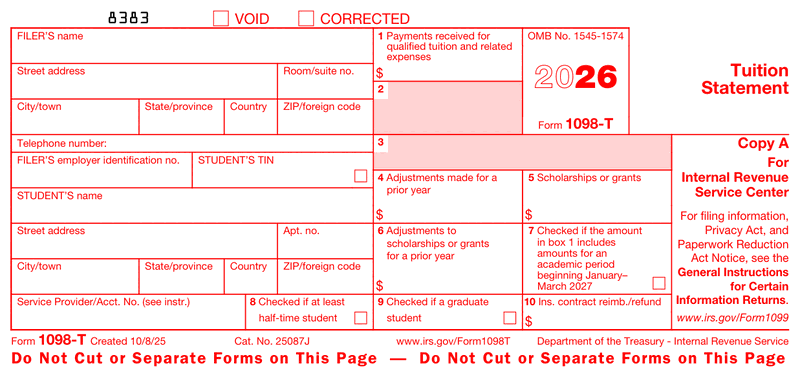





Form 1098-T Box-by-Box Breakdown
Most people land here holding the form and needing to know what one specific box means. Boxes 2 and 3 are reserved by the IRS and left blank, so the active fields are the ones below.
| Box | What It Reports |
|---|---|
| Box 1 | Payments received for qualified tuition and related expenses during the year. This is the headline number for your credit. |
| Box 4 | Adjustments for a prior year. A reduction to tuition that was reported on a previous 1098-T, which may require you to refigure an earlier credit. |
| Box 5 | Scholarships or grants administered by the school. This amount reduces the expenses you can count toward a credit. |
| Box 6 | Adjustments to scholarships or grants reported for a prior year. |
| Box 7 | A checkbox showing that Box 1 includes amounts for an academic term starting in January through March of the following year. |
| Box 8 | A checkbox indicating you were enrolled at least half-time, a requirement for the American Opportunity Credit. |
| Box 9 | A checkbox indicating you were a graduate student, which rules out the American Opportunity Credit but not the Lifetime Learning Credit. |
| Box 10 | Reimbursements or refunds from an insurance contract, filed only by insurers. Most students never see an amount here. |
Two boxes drive most of the confusion. Box 1 and Box 5 work against each other: your credit is generally based on Box 1 minus the tax-free aid in Box 5, not on Box 1 alone. And the Box 8 half-time checkbox quietly determines which credit you qualify for, so it is worth confirming it matches your actual enrollment. The filer section at the top carries your school's name and taxpayer identification number, and your own Social Security number or ITIN appears in the student area.
Education Tax Credits: AOTC vs. Lifetime Learning Credit
The whole reason the 1098-T matters is the credit it supports, and there are two. Comparing them side by side makes the choice obvious for most filers.
| Feature | American Opportunity Credit (AOTC) | Lifetime Learning Credit (LLC) |
|---|---|---|
| Maximum per year | Up to $2,500 per student | Up to $2,000 per return |
| Refundable | Yes, up to $1,000 can come back as a refund | No, it only reduces tax owed |
| Years available | First four years of undergraduate study | Unlimited, including graduate and single courses |
| Enrollment | At least half-time | Any level, even one class |
The AOTC is the stronger credit when you qualify, because part of it is refundable and it reaches a higher ceiling. The LLC is the fallback for graduate students, part-time learners, and anyone past their first four years. You claim whichever applies on IRS Form 8863, and the result carries to Schedule 3 of your return. If your goal is to lower your taxable income as efficiently as possible, running both calculations before you file is worth the few minutes.
Financial Aid, Scholarships, and Your 1098-T
Here is the question that trips up students every spring: do you get a 1098-T if you receive financial aid? Usually yes, but the aid changes what the form shows. Grants and scholarships appear in Box 5 and reduce the qualified expenses you can count, so heavy aid can shrink or erase your credit even though a form still arrives.
There is a real exemption, though. If scholarships, grants, or a third party fully cover your tuition and required fees, the school is not required to issue a 1098-T at all, because there is no out-of-pocket qualified expense to report. The same goes for non-credit courses and some nonresident students. This trips people up every spring, so it helps to know the rule before you go hunting for a form that was never issued. One nuance worth flagging: scholarship money spent on tuition is tax-free, but aid used for room and board can be taxable, similar to how grants can count as taxable income in other settings.
1098-T Deadlines for the 2027 Filing Season
Three dates govern the 1098-T, and missing them carries real consequences on the school's side. For 2026 tuition reported during the 2027 filing season, the schedule is:
| Obligation | Statutory Date | Actual 2027 Due Date |
|---|---|---|
| Student copy furnished | January 31 | February 1, 2027 |
| Paper filing with the IRS | February 28 | March 1, 2027 |
| Electronic filing with the IRS | March 31 | March 31, 2027 |
Two of those dates shift this year, which is the detail most filing calendars miss. When a due date lands on a weekend or federal holiday it rolls to the next business day, a rule you can confirm on the IRS page for Form 1098-T. Both January 31 and February 28 fall on a Sunday in 2027, so the real deadlines are Monday February 1 and Monday March 1. Only the March 31 electronic date is unchanged. For students, early February is when the form should be available, whether by mail or in an online account, and filing a return before that copy is in hand risks doing the credit math on the wrong numbers. The same discipline applies to any pay stub used for tax filing: work from final figures, never estimates.
Filing 1098-T Forms as an Institution
If your office is the one issuing a 1098 t at year-end, three rules drive most of the compliance risk, and none of them are obvious from the form itself.
The e-file threshold is now 10, not 250. For information returns required to be filed on or after January 1, 2024, the IRS lowered the electronic filing threshold to 10 returns. The count aggregates across form types, so your 1098-Ts, W-2s, and 1099s all go into one total. A small institution that filed on paper for years can cross the line without noticing, since four 1098-Ts plus six 1099s is enough to trigger the mandate.
Penalties apply twice for the same form. Section 6721 covers failure to file a correct information return with the IRS. Section 6722 covers failure to furnish a correct statement to the student. They are separate provisions, so a form that is both late to the IRS and wrong on the student copy can draw a penalty under each. Amounts are per form and tiered by how quickly you correct the error, which is why catching a problem in February costs far less than catching it in August.
Soliciting the student TIN has rules. Form W-9S itself is optional, and you can collect the same information through your own admission, enrollment, or financial aid paperwork. The solicitation is not optional, though: Regulations section 1.6050S-1 governs the time and manner of requesting a TIN, and the certification box on Form 1098-T is a penalties-of-perjury statement that you complied with those standards in good faith. Accuracy matters most here, because a TIN mismatch is the error most likely to come back as an IRS notice.
Getting Your 1098-T Online From Your School
Most schools no longer mail the form by default. They either post it to your student portal or hand the job off to a third-party servicer, and you retrieve the copy yourself. To get your 1098 T form online, log into your student account, find the tax documents or student financials section, and download the PDF. If you opted out of electronic delivery, a paper copy goes out instead.
One detail surprises students every year: the form may come from a company name you do not recognize, such as Heartland ECSI, a common higher-education servicer that many schools hire to handle tax documents. An email from an unfamiliar processor asking you to enroll for tax forms is usually legitimate, not a scam, though it always pays to confirm through your school first. And if a school portal will not load the document, switch browsers before you give up, since a statement that refuses to open in one browser will often load fine in Chrome, Firefox, or Safari.
How to Create a 1098 T Form Online
Bursar offices, financial aid staff, and the third-party servicers schools hire all need clean, correctly formatted statements, sometimes in volume at year-end and sometimes one replacement at a time. Our 1098 t generator produces the document in three steps.
- Enter the details. Add the filer and student information, then the amounts for Box 1, Box 5, and any checkboxes that apply.
- Preview the result. Confirm the figures and box placement before you commit. Fixing an error here costs nothing.
- Download the PDF. Save it to your records and deliver the student copy.
Once it is generated, archive the PDF wherever your office keeps student records, or save it to a cloud drive if you are the student and need it ready for a FAFSA renewal or a lender request. One caveat worth knowing before you rely on it: a generated copy works for your own records and for the student copy, but paper filing the official scannable version with the IRS still requires the red-ink form, while electronic filing avoids that requirement entirely. Running payroll documents in the same sitting? Our pay stub templates cover that side too.
Common 1098-T Mistakes to Avoid
Run through this quick checklist before you issue a 1098 t form or rely on one you received:
- Mismatched TIN. A student Social Security number that does not match IRS records can delay a credit or trigger a notice.
- Ignoring Box 5. Claiming a credit on Box 1 alone, without subtracting scholarships, overstates the expense and creates exactly the kind of return-versus-information-return mismatch that ranks among common IRS audit red flags.
- Confusing it with Form 1098. The mortgage interest 1098 is a different form entirely.
- Filing the form itself. You keep the 1098-T; you do not attach it to your return.
Which Tax Year of Form 1098-T Do You Need?
Unlike the continuous-use information returns, the 1098-T prints its tax year on Copy A, so "1098 t form 2025" and "1098 t form 2026" really are two different documents. Your office issues the version matching the year the payments came in, not the year you file.
| Tax year on Copy A | Student copy furnished | Paper filing | Electronic filing |
|---|---|---|---|
| 2025 | February 2, 2026 | March 2, 2026 | March 31, 2026 |
| 2026 | February 1, 2027 | March 1, 2027 | March 31, 2027 |
Between the two versions, almost nothing moved. The entire 2026 What's New is address fields separated into individual entry boxes, plus the carryover e-file threshold and IRIS reminders. No box renumbering, no threshold change, no rule change, no deadline change. A process built on the 2025 layout still works, though your print template may need adjusting for the split address fields.
Form 8809, filed by the original due date, buys an automatic 30 days from that due date, but the IRS publishes no fixed extended date, because the 30 days runs from whichever deadline applies to you. Student copies run on a separate track: Form 15397 grants a one-time extension of up to 30 days, submitted no later than the date the statements are due.