Payroll Services for Small Business: A 2026 Guide
By Jaden Miller , September 20 2026

Running payroll by hand eats into the hours you should spend growing your business. Calculating wages, withholding taxes, and filing returns can consume an entire workday each pay period. The right payroll services remove that burden. They handle tax filing, direct deposit, compliance, and pay stub creation for you. This guide breaks down the top payroll services for small business owners in 2026. You'll find real pricing, setup steps, and compliance tips for teams of 1 to 50 employees.
Key Takeaways
- Most small business payroll services cost $35 to $40 per month plus $5 to $6 per employee
- Full-service providers handle tax filing, W-2s, 1099s, and compliance automatically
- Setting up payroll takes 1 to 2 hours initially but runs in under 10 minutes each pay period after that
- At fewer than 25 employees, outsourcing payroll is more cost-effective than hiring a payroll specialist
What Are Payroll Services?
Payroll services calculate employee wages, withhold taxes, and send payments on your behalf. They range from basic software to full-service providers. Most handle tax filing, W-2 and 1099 forms, direct deposit, and compliance. They also generate pay stubs for each pay period. Small business plans run $35 to $40 per month plus a per-employee fee.
There are three main types of payroll service.
Full-service payroll covers everything from tax math to quarterly IRS filings. You approve the run. The payroll provider handles the rest. This is the standard for most small businesses in 2026.
Self-service payroll software gives you the tools to run payroll yourself. You handle tax filings on your own. It costs less, but the compliance burden stays with you. Some small business owners start here, then upgrade to a full payroll processing service once they hire more staff.
Professional Employer Organizations (PEOs) bundle payroll processing with HR, benefits administration, and workers compensation coverage under one contract. PEOs work well for businesses that want one vendor for all employment tasks.
For most teams of 1 to 50, full-service automated payroll is the best fit. Online payroll processing through these providers is the fastest way to setup payroll for small business. The cost gap between full-service and self-service is $15 to $20 per month. That small difference removes the risk of missed tax deadlines.
Top Payroll Services for Small Business Owners

These payroll companies for small business serve teams of 1 to 50 employees. Each is a full service payroll provider with tax filing, direct deposit, and compliance tools built in. Here are the top payroll processors to consider in 2026.
Gusto: Best Full-Service Payroll for Growing Teams
Gusto starts at $40 plus $6 per person per month with unlimited payroll runs in all 50 states. It handles tax filing, Form W-2 and Form 1099 processing, benefits administration, and workers' compensation. It syncs with Xero, QuickBooks, and TSheets. Over 300,000 businesses use Gusto, and 88% say it helps them stay compliant. For growing teams that need payroll software with HR tools, Gusto covers the most ground.
OnPay: Best for Recordkeeping and HR Compliance
OnPay costs $40 plus $6 per person per month and includes a one-month free trial. It offers health insurance in all 50 states, 401(k) plans, HSA and FSA administration, and PTO tracking. OnPay syncs with QuickBooks Online and Xero. It's a strong fit for businesses that need payroll bundled with benefits. Employee self-service portals let your team view their own pay stubs and tax forms.
Square Payroll: Best for Seasonal and Hourly Teams
Square Payroll runs $35 plus $6 per employee per month. You can pause your plan during slow months and restart without a penalty. Multistate payroll comes at no extra charge. Square is built for retail, food service, and businesses with shifting staff needs. If your headcount changes each quarter, this option saves money.
SurePayroll: Best for Micro-Businesses With 1 to 10 Employees
At $29.99 plus $5 per employee per month, this is one of the lowest entry points for full-service payroll. SurePayroll includes a six-month free trial. A self-service option runs $19.99 plus $4 per employee. Their tax filing guarantee means SurePayroll covers any penalties caused by errors on their end. For businesses under 10 employees, this small business payroll company is one of the most affordable options on the market.
Patriot Software: Most Affordable Full-Service Option
Patriot Software charges $37 plus $5 per employee for full-service payroll. Self-service runs $17 plus $4 per employee. Free payroll set up is included. Patriot works well as a payroll processor for businesses under 20 employees that want solid small business payroll processing without extras. If you don't need benefits or 401(k) tools, this keeps costs low.
Roll by ADP: Best for Mobile-First Payroll
Roll by ADP costs $39 plus $5 per employee per month with a three-month free trial. The standout feature is AI-driven, chat-based payroll. You can run payroll in under one minute by text. Same-day and next-day direct deposits work in all 50 states. Roll is ADP's AI-powered payroll tool, built for business owners who run things from their phone.
Rippling: Best for Tech-Forward Businesses
Custom pricing sets this platform apart from the flat-rate crowd. It connects with over 500 tools like Slack, Zoom, QuickBooks, and Salesforce. Rippling handles contractor payments abroad, PEO services, Employer of Record support, and multistate payroll. Its HR integration connects payroll, IT, and benefits on one platform. As one of the top online payroll companies, Rippling combines tools that other payroll companies for small businesses sell one by one.
Payroll Services Pricing: What Small Businesses Actually Pay
Here's what the leading payroll online services charge in 2026. These payroll services small business owners use most often range from $30 to $40 per month.
| Service | Base/Month | Per Employee/Month | Free Trial | Tax Filing |
|---|---|---|---|---|
| Gusto | $40 | $6 | No | Full-service |
| OnPay | $40 | $6 | 1 month | Full-service |
| Square | $35 | $6 | No | Full-service |
| SurePayroll | $29.99 | $5 | 6 months | Full-service |
| Patriot | $37 | $5 | No | Full-service |
| Roll by ADP | $39 | $5 | 3 months | Full-service |
| Wave Payroll | $40 | $6 | 30 days | 14 states only |
Enterprise providers like Paychex and Paycom offer custom pricing but are built for larger teams. For a 10-person team, monthly costs range from $80 (SurePayroll) to $100 (Gusto, OnPay). That's $960 to $1,200 per year for automated payroll services, tax filing, and compliance. These are payroll solutions for small business that pay for themselves quickly.
Now compare that to hiring. A payroll specialist earns about $39,680 per year on average. At $25 per employee per month for small business payroll outsourcing, the breakeven is roughly 112 employees. For small company payroll, outsourcing wins on cost alone.
How to Choose the Right Payroll Service

Picking the right payroll service for small business comes down to five things.
Tax compliance. Every provider on this list handles federal tax filing. Make sure yours also covers state and local taxes. This matters most if you run a multistate payroll. Gusto, Square, and Rippling include it at no extra cost.
Tool sync. If you use QuickBooks or Xero for accounting, pick a payroll service provider that connects to it. This cuts double data entry and reduces errors. Rippling leads with 500+ links. Gusto and OnPay cover the most common platforms.
Room to grow. Your payroll system management needs change as you hire. Look for unlimited payroll runs, flexible pay schedules, and the ability to add contractor payments without plan upgrades. The best payroll providers for small business scale with you as your team grows.
Cloud based payroll software with mobile access. Owners who manage on the go need a solid mobile app. Roll by ADP is built for mobile. Gusto and Square also offer mobile payroll.
Support hours. Payroll issues don't wait until Monday. Check if your provider offers phone and chat help outside normal business hours.
One common mistake is using accounting software for payroll. Running payroll in QuickBooks handles the books, but it skips tax filing. You'd have to calculate withholdings, file Form 941 each quarter, and submit state taxes yourself. A payroll service does all of it for you.
If you're weighing payroll and HR services for small business against separate vendors, consider bundled options from Gusto or Rippling. When it comes to payroll for small business, most companies under 25 employees find that a payroll company without the HR bundle is the cheaper path. There are also payroll services for self employed workers who need to manage their own payroll and accounting services for small business.
How to Set Up Payroll Services for Your Business
First-time payroll setup takes 1 to 2 hours. After that, each run takes 3 to 10 minutes for a 10-person team.
Step 1: Gather employee info. Collect a W-4 (federal withholding), I-9 (work eligibility), direct deposit form, and state tax forms for each person. You'll also need your EIN and state payroll tax registration.
Step 2: Pick your pay schedule. Set your frequency based on state rules. Most states allow biweekly or semi-monthly payroll. California requires semi-monthly at minimum. New York requires weekly pay for manual workers. Set direct deposit as the default.
Step 3: Run your first payroll. Enter hours or salaries, check deductions, and preview before you approve. Make sure your provider will file Form 941 each quarter and handle W-2 and 1099 forms at year-end.
After your payroll setup is done, the process gets routine. Most payroll processing services for small business offer autopilot modes that run payroll on schedule with no manual steps.
Payroll Services Tax Filing and Compliance Essentials
Tax compliance is where payroll services for small businesses add the most value. Here's what you must handle as an employer.
Quarterly filings. File Form 941 with the IRS every quarter. Full-service payroll processing companies do this for you. They also handle FICA tax withholding as part of each payroll run.
Year-end forms. Send W-2 forms to employees and 1099 forms to contractors by January 31. Your payroll provider should create, file, and deliver these.
New hire reporting. Report each new hire to your state within 20 days of their start date. Most payroll services online automate this step.
State payroll taxes. Register for state tax accounts before you issue your first paycheck. Rules vary by state. Skipping this step can lead to penalties.
Full service payroll providers handle most payroll compliance for you. Any payroll service for small businesses should cover your state's tax filing needs. Verify this before you commit.
What Your Employees Need to See on Their Pay Stubs
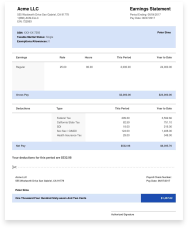
Most payroll services create digital pay stubs each pay period. As an employer, each stub must show gross wages, deductions, and net pay, the pay period, and your business info.
Employees access their stubs through a self-service portal. They can also view W-2s and year-end tax forms there. This cuts your admin work.
Don't use a full payroll system? A payroll service small business owners can use for standalone stubs is also an option. A paystub generator creates compliant pay stubs with accurate tax math in minutes.
You Might Also Like
- 3 Types of Taxes Every Business Owner Should Know
- Using Your Pay Stub for Tax Filing
- How to Access Pay Stubs From Any Employer
- Medicare Tax: What It Is and How It Works
- How to Estimate Quarterly Taxes for 1099 Income
Conclusion
The right payroll services for small businesses save time, cut compliance risk, and scale with your team. Whether you pick Gusto or a budget option like SurePayroll, an automated payroll service pays for itself fast. Payroll for small businesses doesn't have to be complex.
Start with the service that fits your team size now, then scale as you grow. When you need pay stubs for your employees, our paystub templates handle it in minutes with accurate math and a clean format.



Frequently Asked Questions
Similar Articles



We’ve helped numerous individuals and businesses create professional documents! Create yours today!