

Why Your State Matters on a Pay Stub
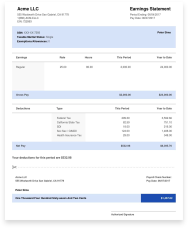
Federal taxes work the same everywhere, but state taxes do not. Some states have no income tax at all. Others have their own rates and filing rules. A stub with the wrong state tax will not match the rest of your records.
PayStubs.net uses the state you pick to work out the state income tax for each pay period. You enter your pay, and the state part is handled for you.
What You Set for Your State
- Company and worker state. Pick the state from the list. All 50 states and D.C. are on it.
- State filing status. Single, married, or head of household.
- State allowances. Add state allowances if your state uses them.
- Working from home. Mark a worker who works from home.
- State exemptions. Mark special cases, like a California SDI exemption.
State-Specific Pay Stub Features
- All 50 states and D.C. Every state is on the list, plus Washington, D.C.
- State income tax done for you. State tax is worked out from your pay and your state filing status. In states with no income tax, like Texas and Florida, none is taken out.
- Federal taxes too. Federal income tax, Social Security, and Medicare are worked out on the same stub.
- Separate filing status. Set your federal and state filing status on their own, since they are not always the same.
- Instant PDF. Download your stub the moment you finish.
Frequently Asked Questions
Does PayStubs.net work in my state?
Yes. All 50 states and Washington, D.C. are on the list. Pick your state when you enter the company and worker details.
How is state tax worked out?
State income tax is based on your pay for the period, your state, and your state filing status. You can also add state allowances if your state uses them.
What if my state has no income tax?
Then no state income tax is taken out. Texas and Florida are two of the states with no income tax on wages.
Can my state filing status be different from my federal one?
Yes. Federal and state filing status are set on their own. Pick single, married, or head of household for each.
Does the stub include federal taxes too?
Yes. Federal income tax, Social Security, and Medicare are worked out on the same stub, next to your state tax.
Can I make stubs for more than one pay date?
Yes. Make up to 26 pay dates in one order. The year-to-date totals for state and federal taxes carry over from one stub to the next.
State Taxes, Handled for You
Pick your state, enter your pay, and download a pay stub with your state and federal taxes worked out.