

Why Salaried Workers Need Pay Stubs
A salary is a set amount for the year, but you are paid in pieces. Landlords and lenders want to see both: what you earn each payday and what that adds up to over the year.
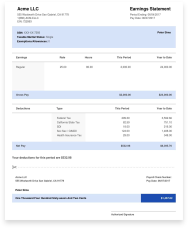
A salaried pay stub shows your pay for the period, the taxes taken out, your take-home pay, and your year-to-date totals. It is the simplest way to show a steady income.
Pick Your Pay Schedule
- Weekly. Paid every week, for example every Friday.
- Every two weeks. Also called biweekly, for example every other Wednesday.
- Twice a month. Also called semi-monthly, for example the 1st and the 16th.
- Monthly. Paid once a month.
- Other schedules. Daily, quarterly, twice a year, or once a year.
Salaried Pay Stub Features
- Enter the yearly salary. Type in the annual salary once and pick the pay schedule. The stub shows the pay for that period.
- Eight pay schedules. Daily, weekly, every two weeks, twice a month, monthly, quarterly, twice a year, or once a year.
- Pay period dates filled in. Pick a pay date and the pay period start and end dates are set to match your schedule. You can change them if you need to.
- Taxes done for you. Federal tax, state tax, Social Security, and Medicare are worked out from the salary and filing status.
- YTD totals. Year-to-date pay and taxes show next to the current period.
Frequently Asked Questions
How do I make a pay stub for a salaried employee?
Pick Salary as the pay type, enter the yearly salary, and choose how often the employee is paid. Add the pay dates, and the stub shows the pay, taxes, and take-home pay for each period.
Which pay schedules can I pick?
Weekly, every two weeks (biweekly), twice a month (semi-monthly), and monthly are the most common. You can also pick daily, quarterly, twice a year, or once a year.
What is the difference between biweekly and semi-monthly?
Biweekly means every two weeks, which usually gives 26 paychecks a year. Semi-monthly means twice a month on set dates, like the 1st and 16th, which gives 24 paychecks a year. Biweekly checks are a little smaller, but there are more of them.
Do I have to work out the pay for each period myself?
No. Enter the yearly salary and the pay schedule, and the stub shows the pay for that period.
Can a salaried stub include a bonus?
Yes. Add a bonus, commission, or other extra pay as its own line on top of the regular salary.
Will the stub show year-to-date totals?
Yes. YTD pay and taxes show next to the current period. If you make several pay dates in one order, the YTD totals carry over from one stub to the next.
Your Salary, Split by Pay Period
Enter the yearly salary, pick the pay schedule, and download a clean pay stub that shows the pay for each period.