

Why Year-to-Date Totals Matter
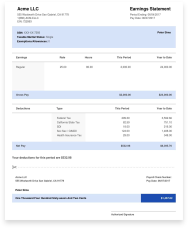
Year-to-date, or YTD, is the running total of what you have earned and paid in taxes since January 1. Lenders and landlords look at it to see your income over the whole year, not just one payday.
A stub without YTD totals only tells part of the story. With them, one page shows this period's pay and the year so far, so the person checking it does not have to add anything up.
What Your YTD Pay Stub Shows
- Gross pay. What you earned this period and so far this year.
- Federal and state taxes. The income tax taken out this period and year to date.
- Social Security and Medicare. The current amounts and the YTD amounts.
- Extra pay. Overtime, tips, bonuses, and other pay, each with its own YTD amount.
- Net pay. What you took home this period.
YTD Pay Stub Features
- YTD worked out for you. Tell us how many pay dates you have had this year, and the year-to-date totals are worked out from there.
- Use your real YTD wages. If you already know your wages so far this year, enter them and the stub uses that number.
- Federal and state taxes included. Federal tax, state tax, Social Security, and Medicare are taken out each period and added to the YTD totals.
- Totals that carry over. Make up to 26 pay dates in one order, and each stub picks up the YTD totals from the one before it.
- Instant PDF. Download, print, or email your stub the moment you finish.
Frequently Asked Questions
What does YTD mean on a pay stub?
YTD means year to date. It is the total of your pay and taxes from January 1 up to this pay date. It shows up next to the numbers for the current pay period.
How are my YTD totals worked out?
You tell us how many pay dates you have already had this year, or the wages you have earned so far. The system works out the YTD pay and taxes from there and adds this period on top.
Are federal and state taxes included?
Yes. Federal income tax, state income tax, Social Security, and Medicare are worked out for each period and added to your YTD totals. In states with no income tax, like Texas and Florida, no state income tax is taken out.
Why do lenders and landlords look at YTD totals?
YTD shows your income over the year, not just one paycheck. It helps them see that your pay is steady and matches what you told them.
Can I make several stubs with YTD totals that line up?
Yes. You can make up to 26 pay dates in one order. The YTD totals carry over from one stub to the next, so the whole set lines up.
Can I add bonuses or overtime to my YTD totals?
Yes. Add overtime, tips, bonuses, commission, or other pay as their own lines. Each line has a current amount and a YTD amount.
Track Your Earnings All Year
Enter your pay, tell us where the year stands, and download a pay stub with clear YTD totals for your pay and taxes.