

Why Your Team Needs Pay Stubs
Your workers use their pay stubs for more than checking their pay. They need them to rent an apartment, get a car loan, or apply for help programs. When a stub is missing or hard to read, they come to you for answers.
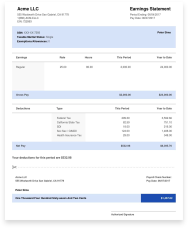
PayStubs.net makes a clean stub for each worker in a few minutes. You enter the pay, and we work out the federal and state taxes, Social Security, and Medicare.
What You Can Put on Each Stub
- Your company details. Company name and address, plus your phone number, EIN, and logo if you want them.
- Hourly or salary pay. Pick Hourly and enter the rate and hours, or pick Salary and enter the yearly amount.
- Employees and contractors. Choose Employee or Contractor for each person you pay.
- Extra pay. Add overtime, tips, bonuses, commission, vacation pay, or holiday pay.
- Direct deposit slip. Add a deposit slip at the bottom that shows the worker's net pay.
Pay Stub Features for Employers
- Taxes done for you. Federal tax, state tax, Social Security, and Medicare are worked out from the pay you enter and each worker's filing status.
- A stub for each person. Make a stub for each person on your team, one at a time. Each one takes just a few minutes.
- Several pay dates in one order. Need a month or more of stubs for one worker? Make up to 26 pay dates in one go, with year-to-date totals that carry over.
- Pick a template. Choose from several clean pay stub templates and preview the stub before you download it.
- Instant PDF. The PDF is ready as soon as you finish, so you can print it or email it on payday.
Frequently Asked Questions
Can I make pay stubs for all my employees?
Yes. You make one stub at a time, one person at a time. Enter your company details, then the worker's name, pay type, and pay dates. Repeat for each person on your team.
Does it work for hourly and salaried employees?
Yes. Pick Hourly to enter a pay rate and the hours worked, or Salary to enter a yearly salary. The stub shows the pay for that period and the taxes taken out.
Can I make pay stubs for contractors too?
Yes. Choose Contractor instead of Employee when you add the worker. The stub shows what you paid them for that period.
Can I add my company logo?
Yes. You can upload your logo and add your company phone number and EIN. All three are optional.
Which taxes are worked out?
Federal income tax, state income tax, Social Security, and Medicare, based on the pay you enter and the worker's filing status. You can also mark special cases, like a worker who is exempt from federal income tax.
Do I need payroll software or an account?
No. It all works in your browser. There is nothing to install and no account to set up.
Pay Stubs for Your Whole Team
Enter your company and worker details, let the system handle the taxes, and download a clean, professional pay stub for each person on your team.