Why Hourly Workers Need a Clear Breakdown
When you are paid by the hour, your pay changes with your schedule. A pay stub that only shows one total does not explain why one check is bigger than the last.
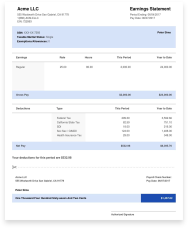
An hourly pay stub shows the math: your rate, the hours you worked, any overtime, and the taxes taken out. Anyone who reads it can see exactly how your pay was built.
What an Hourly Pay Stub Shows
- Your hourly rate. You can show it on the stub or leave it off.
- Hours worked. Set the hours for each pay date, so a short week and a long week each look right.
- Overtime. Add your overtime rate and hours, and the overtime pay is worked out for you.
- Tips and other pay. Add tips, bonuses, commission, or holiday pay as their own lines.
- Taxes and take-home pay. Federal tax, state tax, Social Security, Medicare, and your net pay.
Hourly Pay Stub Features
- Regular and overtime hours. Regular hours and overtime hours show on separate lines, each with its own rate.
- Overtime math done for you. Enter the overtime rate and the overtime hours. The system multiplies them and shows the overtime pay.
- Different hours each pay date. Make several pay dates in one order and set the hours for each one.
- Taxes done for you. Federal tax, state tax, Social Security, and Medicare are worked out from your pay and filing status.
- Any pay schedule. Daily, weekly, every two weeks, twice a month, or monthly. Pick the one that matches your paydays.
Frequently Asked Questions
How do I make an hourly pay stub?
Pick Hourly as the pay type, enter your hourly rate and the hours you worked, and add the pay dates. The system works out your gross pay, taxes, and take-home pay.
Can I add overtime hours?
Yes. Add an overtime line, then enter your overtime rate and the number of overtime hours. The overtime pay is worked out and shown on its own line.
What if my hours change every week?
That is normal for hourly work. When you make more than one pay date, you can enter different hours for each one.
Can I add tips?
Yes. Tips, bonuses, commission, vacation pay, and holiday pay can each go on their own line, so the stub shows where every dollar came from.
Does the stub show my hourly rate?
It can. There is an option to show your hourly rate on the pay stub. Use it if you want the person reading the stub to see how your pay adds up.
Which taxes come out of hourly pay?
Federal income tax, state income tax, Social Security, and Medicare. They are based on your pay for the period and your filing status.
Hourly Pay, Clearly Broken Down
Enter your rate and hours, add any overtime or tips, and download a pay stub that shows exactly how your pay adds up.