Pay Stub Canada at a Glance

  • A pay stub records one pay period; a T4 summarizes the full calendar year.
  • Every province and territory requires employers to give employees a written wage statement each pay period.
  • Year-to-date totals are the field employers most often leave off, and a missing YTD is a common reason a stub gets rejected.
  • Quebec runs a parallel system through Revenu Quebec, so verify those numbers separately.
  • CPP, EI, and tax figures change every January, so never reuse last year's static template.
blue dollar money icon 100% Money-Back Guarantee

We understand that satisfied customers are loyal customers and we strive to provide you with high quality documents.

blue unlock secure payment icon 100% Secure Payment

Our secure payment method provides you with the utmost security, the ease and the peace of mind you deserve.

blue conversation bubble icon 100% Customer Satisfaction

Having our customers at the core of our business, we make sure that our experienced customer care team is on call 24/7.

How the Canada pay stub maker works

How It Works

  • Choose your province

    Pick any of the 13 provinces and territories. The stub applies that province's deduction rules, including Quebec's own structure.

  • Enter pay details

    Add the employer's Business Number, the employee's details and the pay amounts. CPP, EI and taxes are calculated for you.

  • Preview and download

    Check every line on the free live preview, then pay once and download your stub instantly.

Everything You Need To Know

Payroll paperwork never scales well. You hire a second employee, then a third. Suddenly every second Friday disappears into spreadsheets and deduction math. That's the owner, the office manager, or the bookkeeper fitting payroll around everything else.

What Is a Pay Stub?

A pay stub is the itemized record an employer issues each pay period. It shows an employee's gross pay, deductions such as CPP, EI, and income tax, and the resulting net pay. In Canada it covers a single pay period, unlike a T4, which sums up the full calendar year.

Search for "what is pay stub" or "what is a paystub" and you'll get a dozen answers, most written for employees. The pay stub meaning that matters to a business is simpler. It's your proof that you paid the right amount and withheld the right deductions.

Some payroll systems label the same document an earnings statement, and outside North America you'll hear it called a payslip. The difference between a pay stub and a payslip is mostly regional wording, not substance.

That proof does real work. It backs you up in an employment standards complaint. It supports your remittances to the Canada Revenue Agency. It's also the document your employee hands a landlord or lender as proof of income.

How to Read a Pay Stub, Line by Line

Read a Canadian pay stub top to bottom in four blocks. First comes gross pay and hours worked. Next are statutory deductions: CPP or QPP, EI, and income tax. Then any other deductions, such as benefits, followed by net pay. Check the year-to-date column last, since it is the field most often missing.

These are the lines your employees will ask you about, so it's worth knowing each one cold.

Gross Pay

Total earnings before anything comes off. That includes regular hours, overtime, commissions, and bonuses. For hourly staff, the stub should show the rate and the hours so the math is checkable. If an employee disputes their pay, this is the first line you'll both look at.

CPP and EI

Canada Pension Plan and Employment Insurance are the two statutory deductions every Canadian employer handles. Both are a percentage of eligible earnings. Both stop once the employee hits that year's annual maximum. You're not just withholding these. As the employer, you pay your own share on top.

Federal and Provincial Income Tax

Two separate withholding streams apply here, and the amounts depend on the employee's TD1 forms and where they work. An employee who moves provinces mid-year will see this line shift. That often catches people off guard, so flag it before they call you about it.

Other Deductions

Anything beyond the statutory items sits here: benefit premiums, union dues, RRSP amounts, garnishments. Each one needs its own line rather than a lumped "deductions" total. Employees have a right to see what was taken and why.

Net Pay and Year-to-Date

This is the number your employee actually checks first, and the one they'll question if it looks off. Running totals since January 1 sit alongside it, and that's the field skipped most often. Stubs missing those totals get rejected for mortgage and rental applications. Your employee then comes straight back to you for a corrected copy.

Pay Stub Canada Requirements: What Must Appear on Every Stub

Pay stub Canada rules come from provincial employment standards rather than one federal statute. Each province and territory sets its own wage statement rules, so the exact list varies. Federally regulated employers follow the Canada Labour Code instead. That covers banks, airlines, and telecoms. In nearly every province, though, a compliant stub includes:

  • Employer name and employee name
  • Pay period start and end dates
  • Hours worked and the rate of pay
  • Gross earnings for the period
  • Each deduction listed separately
  • Net pay
  • Year-to-date totals

Paystub Canada Rules Vary by Province

Here's where a generic "works everywhere in Canada" claim deserves a closer look. Quebec runs a parallel system. Employees pay into the Quebec Pension Plan instead of CPP, provincial tax is handled by Revenu Quebec, and QPIP premiums apply. If any of your staff work in Quebec, check those figures against Revenu Quebec directly. Don't assume a Canada-wide tool has it covered. You can review current employer duties through the CRA's payroll guidance for businesses.

Pay Stub Rules by Province

Pay statement requirements are set by each province and territory. Pick yours below — the stub is generated with that province's deductions applied.

Alberta

A written statement of earnings and deductions is required for each pay period. Create an Alberta pay stub

British Columbia

Employers must give a wage statement every payday, on paper or electronically. Create a BC pay stub

Manitoba

Pay statements must show hours, wage rate, deductions and net pay. Create a Manitoba pay stub

New Brunswick

Every statement must let the employee see how the pay was calculated. Create a New Brunswick pay stub

Newfoundland and Labrador

A pay statement must accompany each payment of wages. Create an NL pay stub

Northwest Territories

Employees receive a statement of pay and deductions each payday. Create an NWT pay stub

Nova Scotia

Statements must detail the pay period, rate, hours and each deduction. Create a Nova Scotia pay stub

Nunavut

A written pay statement is required with every wage payment. Create a Nunavut pay stub

Ontario

Stubs must itemize every deduction; Ontario applies its own provincial credit amounts. Create an Ontario pay stub

Prince Edward Island

Statements must show gross pay, deductions and net pay for the period. Create a PEI pay stub

Quebec

Quebec stubs use QPP instead of CPP and add QPIP — we apply Quebec's structure automatically. Create a Quebec pay stub

Saskatchewan

Employees must receive an itemized pay statement each payday. Create a Saskatchewan pay stub

Yukon

A written record of wages and deductions is required for every pay period. Create a Yukon pay stub

How to Create a Pay Stub in Canada

Setting up a pay stub Canada workflow takes about five minutes the first time. A paystub generator Canada businesses can rely on removes the manual math. The process runs in four steps:

  • Enter your business details. Legal name and address, exactly as they appear on your remittances.
  • Add the employee and pay period. Name, province of employment, and the start and end dates.
  • Enter earnings. Hours and rate, or salary, plus any overtime, commission, or bonus.
  • Review and download. Deductions calculate automatically. Check the YTD figures, then download and issue the stub.

This works the same whether you employ a crew of ten or a single household worker, the way a nanny pay stub does. A good paystub maker stores your business details after that first run. Each pay period after that is mostly a matter of updating hours. The result is an easy pay stub routine your team repeats every payday instead of rebuilding a spreadsheet.

Looking for consistent employee pay records? Our pay stub templates keep every stub in your business formatted the same way.

Why Canadian Businesses Use Our Pay Stub Generator

One distinction trips up a lot of small employers. A paystub calculator returns deduction amounts and nothing else. The CRA's free Payroll Deductions Online Calculator is excellent at exactly that job. What it doesn't do is produce a document you can hand an employee. A full pay stub generator builds the finished record. That means your business details, the pay period, listed deductions, net pay, and running YTD totals on a clean layout.

Deduction calculatorFull pay stub generator
Returns deduction amountsYesYes
Employer and employee detailsNoYes
Pay period and YTD totalsNoYes
Document you can issueNoYes

Every calculation is built around pay stub Canada requirements, not a US template with the labels swapped. That matters once CPP, EI, and provincial tax enter the picture. What you get day to day:

  • Deductions figured against current-year rates, not last year's
  • The same format across every employee, every period
  • An instant download for your records and theirs
  • No payroll provider contract for a team of three

Pay Stub Canada Templates for Your Business

Consistency matters more than owners expect. When every stub shares one layout, questions drop, corrections drop, and your records line up cleanly at year end. A pay stub template Canada employers can reuse each period is the practical way to get there.

Here's the trap. A pay stub template you saved last year is already out of date. CPP contribution rates, EI premium rates, and tax brackets reset every January. A saved spreadsheet or PDF then gets the deductions wrong the moment the calendar turns. Typing new numbers into an old paystub template by hand is how errors reach employees. Those errors show up later as remittance problems.

Generating fresh from a current-year tool avoids all of it. Keeping one approved pay stub Canada layout gives you the formatting consistency you want without the stale math. You're also not the one tracking which rates changed this year, and your team keeps a consistent way to access pay stubs when they need copies later.

Pay Stub Example: What Your Team Receives

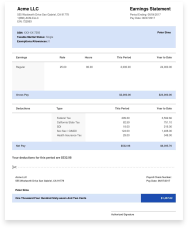
A finished paystub example identifies the employer and employee at the top, then the pay period dates. Earnings are broken out by type. Deductions are listed one by one, and net pay sits clearly at the bottom. YTD figures run alongside the current-period column so the employee sees both at a glance.

Handing over a clean pay stub example answers most questions before they're asked. That's exactly what you want when payroll is one job among many.

Which Tax Year Version Do You Need?

None. There is no annual Canadian pay stub, no numbered revision, and nothing to download for a particular tax year. The requirement sits in employment standards law, not tax law. A federally regulated employer must furnish a wage statement "at the time of making any payment of wages" under Canada Labour Code s.254(1). An Alberta employer must do it at the end of each pay period under Employment Standards Code s.14(2). Other provinces set their own trigger, so confirm yours rather than assuming one national rule. Nothing about that obligation moved: s.254(1) is unamended, and the stub is never filed with the CRA or the IRS.

So when a search reads "pay stub Canada 2026," the year points at the pay periods, not at a different document. What does change every January is the withholding math your stub has to reflect:

Figure20252026
YMPE (first CPP earnings ceiling)$71,300$74,600
YAMPE (second CPP earnings ceiling)$81,200$85,000
Maximum employee CPP contribution$4,034.10$4,230.45
Maximum employee CPP2 contribution$396$416
EI maximum insurable earnings$65,700$68,900
EI employee rate1.64%1.63%
Maximum annual employee EI premium$1,077.48$1,123.07

The CPP rate (5.95%), the CPP2 rate (4%) and the $3,500 basic exemption are unchanged. Quebec's employee EI rate is lower and moves the same way, 1.31% in 2025 to 1.30% in 2026.

FAQs

Is a Pay Stub Required by Law in Canada?

Yes. Employment standards law in every province and territory requires employers to give employees a written statement of wages each pay period. Federally regulated employers follow the Canada Labour Code. Required fields vary by province, so confirm your own rules before you lock in a payroll process.

Does This Work for Quebec?

Quebec runs a parallel payroll system. Employees pay into the Quebec Pension Plan rather than CPP, provincial tax is handled by Revenu Quebec, and QPIP premiums apply. If you employ staff in Quebec, verify those figures against Revenu Quebec before issuing stubs, since generic Canada-wide math may not match.

How Long Do I Need to Keep Payroll Records?

The Canada Revenue Agency requires businesses to keep payroll records for six years from the end of the tax year they relate to. Keep a copy of every stub you issue, not just year-end totals, since that is what supports an audit or an employee dispute.

What Is the Difference Between a Pay Stub and a T4?

A pay stub covers one pay period and shows that period's earnings and deductions. A T4 is the annual slip that sums up an employee's total pay and deductions for the calendar year. Employers must issue it by the end of February following that year.

Do I Issue Pay Stubs to Contractors as Well as Employees?

Independent contractors are not on payroll, so you do not deduct CPP, EI, or income tax, and no statutory pay stub is required. You typically pay against an invoice instead. Getting that classification wrong carries real CRA penalties, so confirm the working relationship first.

What
people
say

5.0 Rating

559 Reviews

white tick in green background icon Verified User
smiley-face Jay Price

I love this website! Its the most reliable & Ive been using it for a few years now. Its the best one out there. Thanks :)

Published Apr 26, 2023
white tick in green background icon Verified User
smiley-face Sherry Logan

Paystubs.net is the best! They take care of all my pay-stub needs.

Published May 26, 2023
white tick in green background icon Verified User
smiley-face Michael Tesfaye

I am so impressed but how prompt and accurate the service was

Published May 05, 2023
white tick in green background icon Verified User
smiley-face Ashley Brandt

Excellent

Published Jun 10, 2023
white tick in green background icon Verified User
smiley-face Todd Osgood

Excellent service and provides me with what I need for my techs

Published May 01, 2023
Experiencing a problem?

Fill out our contact form and we will get back to you soon.

Contact Us
Lost your order?

No need to panic! You can resend your order for free.

Resend Your Order

Jaden Hi! How can I help you?

Hello from our chat team!

To best assist you, please fill out the form, and we'll get back to you swiftly.
Start the chat