Self-Employed Pay Stub: How to Make One in 2026
By Jaden Miller , October 7 2026

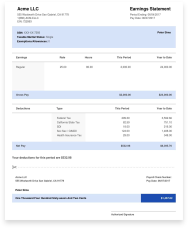
A self-employed pay stub is a record you build yourself: your net profit, your tax set-asides, and your take-home pay for one pay period. No employer issues it, so no paycheck stub ever arrives and you're both the business owner and the payroll department. Done right, it takes minutes.
Want the math handled for you? Our self-employed paystub maker calculates the set-asides and year-to-date totals. Prefer to build it by hand? Below you'll find what goes on the stub, a worked 2026 example, and the records lenders check it against.
Key Takeaways
- Treat your gross pay line as net profit: revenue minus business expenses.
- Show tax lines as set-asides, because nobody withholds for you.
- Self-employment tax is 15.3% on 92.35% of net earnings in 2026.
- Attach your Schedule C, 1099s, and bank statements so the numbers reconcile.
What Goes on a Self-Employed Pay Stub
The layout mirrors an employee stub, with one change: the tax lines are estimates you set aside, not amounts an employer withheld. Every self-employed individual, including professionals like freelancers and consultants, needs these fields:
| Field | What to enter |
|---|---|
| Name and business | Your legal name, business name, and EIN if you have one |
| Pay period and pay date | The dates you earned the income and the date you were paid |
| Gross earnings | Net profit for the period, after business expenses |
| Tax set-asides | Self-employment tax plus your income tax estimate |
| Other deductions | Health insurance or retirement contributions you actually pay |
| Net pay | Gross earnings minus set-asides and deductions |
| Year-to-date totals | Running totals since January 1 |
How to Make a Pay Stub for Self-Employed Income

Follow these steps for each pay period:
- Pick one pay period. Monthly suits most freelancers and gig workers with irregular invoices. Date each stub to the period you were paid.
- Find your gross pay. Subtract business expenses from client payments. Expenses aren't payroll deductions, so the result, your net profit, is the gross line.
- Calculate self-employment tax. It's 15.3% (12.4% Social Security plus 2.9% Medicare) on 92.35% of your net earnings, and it applies once net earnings reach $400. For 2026, the Social Security part stops at $184,500 of earnings. Half of it is deductible on Form 1040, per IRS Topic 554.
- Add an income tax set-aside. This is your own estimate. Estimated payments are due April 15, June 15, September 15, and January 15 of the following year, so the next is January 15, 2027.
- Finish the stub. Subtract the set-asides, update year-to-date totals, and save a PDF beside that month's bank statement. Our record-keeping guide for business owners covers retention.
Here's a 2026 example for a freelance designer in March:
| Line | Amount |
|---|---|
| Client payments | $6,000.00 |
| Business expenses | -$800.00 |
| Gross pay (net profit) | $5,200.00 |
| Self-employment tax set-aside (15.3% of $4,802.20) | -$734.74 |
| Income tax set-aside (example estimate) | -$520.00 |
| Net pay | $3,945.26 |
The $520 is an example choice, not a tax rate. Use your own estimate.
Ways to Make a Self-Employed Pay Stub
Four routes work. Pick based on how much of the math you want to own.
- Online generator: It calculates the set-asides and year-to-date totals, then produces a formatted PDF. Build yours online in minutes.
- Accounting software: QuickBooks and FreshBooks track income and expenses, so you can pull your net profit straight into a stub.
- Payroll service: Gusto, ADP, and Paychex suit owners who also run payroll for staff.
- Spreadsheet: Excel or Google Sheets works if you're comfortable with formulas.
Using a Self-Employed Pay Stub Template
A spreadsheet template costs nothing, but you do the tax math and year-to-date totals by hand, and one wrong cell undermines the document. Our pay stub templates show a layout that works either way.
Why You Need One

Your income varies, but a self-employed pay stub records it in one format each period, so a lender can see whether you have consistent income over time. It matters when you:
- Apply for credit: Lenders use it to judge a mortgage or car loan application.
- Rent a home: Landlords want a clear monthly income figure from every person who applies.
- Plan taxes: The stub tracks what you've set aside for estimated payments.
- Document income: Benefits applications and court matters often ask for it.
For the wider checklist, see our guide to proof of income for the self-employed.
How to Show Pay Stubs When Self-Employed
Attach the documents a lender or landlord can check the stub against: your Schedule C, the 1099-NEC and 1099-K forms you received, and bank statements showing the same deposits. Every figure on the stub should reconcile with those records. Fix any mismatch before you send it.
If you need a refresher on your Schedule C, start there. A stub is a summary, so the tax records carry the weight.
Pay Stubs for Business Owners on Their Own Payroll
Your structure decides what the stub shows. Sole proprietors and default single-member LLC owners take draws, not wages, so the stub documents profit and no W-2 is issued. If you own an S or C corporation and work in it, you're an employee of your company. Real payroll runs, real withholding applies, and you receive a real stub and a W-2.
What this means for your business: match the stub to how the business actually pays you. Our overview of payroll services covers the options.
Keep It Accurate and Compliant
Every figure should trace to real deposits and tax records. Individuals who inflate income to win a loan or a lease commit fraud, not paperwork. A stub you make is a record, not a filing, and a lender may still ask for tax returns. If you plan to hire, check your state's pay stub rules first so your payroll stays compliant. This article is general information, not legal advice.
Conclusion
A solid self-employed pay stub starts with net profit, labels taxes as set-asides, and ties back to your tax records. Build one each pay period and you'll always have documents ready when a lender asks.
Ready to create yours? Use our paystub generator to produce accurate stubs in minutes, with no subscription.
You Might Also Like



Frequently Asked Questions
Similar Articles



We’ve helped numerous individuals and businesses create professional documents! Create yours today!